How does speech recognition turn sound into words?
Speech recognition turns your voice into a wave, the wave into speech sounds, and the sounds into written words.
The big idea: A computer cannot hear words. It measures the sound wave, finds the pattern each speech sound makes, and guesses the words that fit best. Noise makes the guessing harder.
It's like a helper writing down a phone message on a crackly line: they catch each sound, and guess the words that make sense.
The interactive parts didn't load. The explanations below still work; try reloading the page.
How a voice becomes text
- Maya says a word out loud, and a moment later the tablet has written it down. No one typed anything. How does a machine turn a voice into letters?
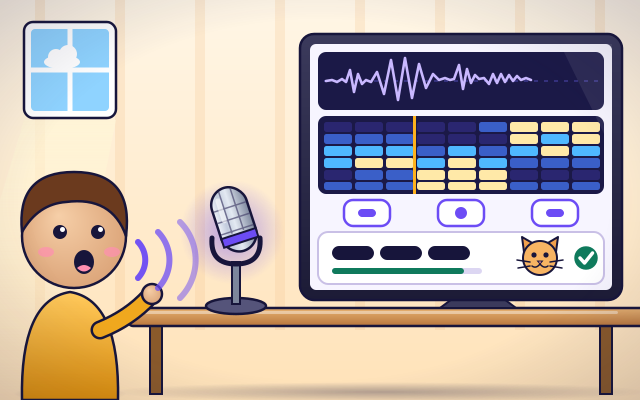
- A voice makes the air shake back and forth. Inside the microphone, a thin sheet shakes with it and turns the shaking into an electrical signal. Drawn on a screen, the signal is a wavy line.
- The computer cuts the wave into tiny slices, each a small fraction of a second long. For each slice it works out which pitches are strong, from low to high, and draws them as a column of colors.
- Each speech sound makes its own pattern. A hissing S looks different from an open A. The computer has learned these patterns from many hours of recorded voices, so it can label the slices: K, A, T.
- Next the computer joins the sounds into words. Often more than one word nearly fits: cat, or cap? It scores each choice and also checks which word makes sense with the words around it.
- The best guess is written as text. Most of the time it is right. But noise, a far-away microphone or an unusual word can blur the patterns, and then the computer writes the wrong word. It never truly knows. It guesses.
From voice to text, step by step
Follow one word on its journey from Maya's voice to text on the screen. Press Start.
- Microphone. Maya's voice shakes the air. A thin sheet inside the microphone shakes too, and turns the movement into an electrical signal.
- Waveform. The signal drawn on a screen is a wavy line. Tall waves are loud parts and flat places are silence. The computer stores it as a long list of numbers.
- Slices. The wave is cut into tiny slices. For each slice the computer measures which pitches are strong, from low at the bottom to high at the top. Bright squares mean strong.
- Speech sounds. Each speech sound has its own pattern. The computer compares the slices with patterns it learned from many voices and labels them: K, A, T.
- Word choices. The sounds are joined into words. When two words nearly fit, the computer scores them and also checks which one makes sense in the sentence.
- Text. The best guess is written on the screen as text. It is usually right, but it is still a guess.
Voice lab
Choose a word for Maya to say and follow it from sound to text. Then turn up the noise in the room and speak again.
Experiment: What happens to the tablet's answer when the room gets noisy?
- Keep the room quiet and say a word. Look at the wave and the slices.
- Slide the noise up to the middle and speak again. What does the tablet write?
- Make it very loud and try once more.
What we found: Noise hides parts of the sound pattern. Sounds that look alike, such as T and P, get mixed up first, so cat becomes cap. With too much noise the tablet cannot even guess.
Turn on JavaScript to try it yourself.
A noisy room
Grandpa's radio must stay on. Make the tablet hear 'dog' correctly anyway: switch off what you can and move the microphone. Get it right on your first Speak for 3 stars.
Why a computer can write what you say
When you talk to a phone, a car or a smart speaker, speech recognition turns your voice into text. It feels instant, but the sound goes on a journey with several steps, and every step is a careful guess.
First the microphone turns the shaking air into an electrical wave. The computer chops that wave into tiny slices, many each second, and for each slice it measures which pitches are strong. Lined up, the slices make a picture of the sound. Different speech sounds make different pictures: a hissing S, a humming M and an open A do not look alike at all.
Next the computer matches the pictures to speech sounds, and joins the sounds into words. It can do this because it was trained: people collected many, many hours of recorded speech with the right words written down, and the computer adjusted itself until its guesses matched. When two words nearly fit, such as cat and cap, it also asks which one makes sense in the sentence.
That is why it can go wrong. Noise, a microphone that is far away, two people talking at once, a rare name, or a way of speaking that the system did not hear much during training can all blur the picture. Good systems are trained on many kinds of voices so that they work fairly for everyone. Our crackly phone call comparison fits well, except that the computer does not understand the message the way a person does. It only finds the most likely words.
Key words
- Microphone
- A device that turns the shaking of the air into an electrical signal.
- Waveform
- A sound drawn as a wavy line: how strong the signal is at each moment.
- Spectrogram
- A picture of a sound that shows which pitches are strong in each tiny slice of time.
- Phoneme
- One speech sound, such as the K, A or T in cat.
- Language model
- A model of which words are likely to come together, used to choose between words that sound alike.
- Homophones
- Words that sound the same but are spelled differently, such as see and sea.
- Signal-to-noise ratio
- How much stronger the voice is than the background noise, measured in decibels.
Check your thinking
-
What is the first thing that happens to your voice in speech recognition?
Show the answer
A microphone turns the shaking air into an electrical wave. Everything starts with the microphone, which changes sound in the air into a signal the computer can measure.
-
Why does noise cause mistakes?
Show the answer
It hides parts of the sound pattern, so sounds that look alike get mixed up. The computer needs to see each sound's pattern clearly. Noise fills in the picture, and T and P start to look the same.
-
What makes it easier for the tablet to hear you?
Show the answer
A quiet room. In a quiet room, your voice is the only sound, so the tablet hears it clearly.
-
The sounds could be 'cat' or 'cap'. How does the computer choose?
Show the answer
It scores how well each word fits the sounds and the sentence around it. The computer gives each possible word a score and picks the highest. A word that makes sense in the sentence scores higher.
-
How did the computer learn what an S or an A looks like?
Show the answer
From many hours of recorded speech with the right words written down. It was trained on huge numbers of examples, adjusting itself until its guesses matched what people really said.
-
A recognizer works well for adults but poorly for young children. What is the most likely reason?
Show the answer
It was trained mostly on adult voices, so children's speech is unfamiliar to it. A model is only as good as its training data. Voices, accents and languages that were rare in the data are recognized less accurately.
You're a Computers & communication expert!
You watched, looked inside, tried it, solved the challenge and went deeper. Pick another question below, or switch the age at the top to see this topic another way.
More about computers & communication
 #339
Computers & communication
How does a translation app change languages?
Translate sample sentences and explore how context affects meaning.
#339
Computers & communication
How does a translation app change languages?
Translate sample sentences and explore how context affects meaning.
 #340
Computers & communication
How does image recognition identify objects?
Label pictures, test a simple classifier, and investigate its mistakes.
#340
Computers & communication
How does image recognition identify objects?
Label pictures, test a simple classifier, and investigate its mistakes.
 #341
Computers & communication
How does a chatbot create replies?
Explore a simplified word-prediction model and compare outputs for different questions.
#341
Computers & communication
How does a chatbot create replies?
Explore a simplified word-prediction model and compare outputs for different questions.
 #342
Computers & communication
How do map apps choose routes?
Compare routes using distance, closures, and travel time on a model network.
#342
Computers & communication
How do map apps choose routes?
Compare routes using distance, closures, and travel time on a model network.
Keep exploring
Games to play next
- Robot RoutesSnap together arrow, repeat and dance blocks to guide Bolt the robot home.
- Bug DetectiveA robot program almost works. Run it, spot the buggy block, and fix it.
- Safe Message DetectiveRead made-up messages, pop-ups and posts, spot the clues, and choose the safe, kind thing to do.
Guide for grown-ups
- How to start homeschooling: a step-by-step guide for familiesA guide for parents · 7 min read
Coding games by grade
Computer skills worksheets by grade
- Preschool Computer Skills Worksheets
- Pre-K Computer Skills Worksheets
- Kindergarten Computer Skills Worksheets
- 1st Grade Computer Skills Worksheets
- 2nd Grade Computer Skills Worksheets
- 3rd Grade Computer Skills Worksheets
- 4th Grade Computer Skills Worksheets
- 5th Grade Computer Skills Worksheets
- 6th Grade Computer Skills Worksheets
- 7th Grade Computer Skills Worksheets
- 8th Grade Computer Skills Worksheets