How does image recognition identify objects?
Image recognition learns from many labeled pictures. Then it gives its best guess about a new one, and sometimes it is wrong.
The big idea: A computer does not see an apple. It finds patterns in pixels and compares them with labeled examples it learned from. If the examples leave something out, it makes mistakes, even when it sounds sure.
It's like learning to spot birds from a field guide: after many labeled pictures you can name a new one, but a bird that is not in your guide will fool you.
The interactive parts didn't load. The explanations below still work; try reloading the page.
How a computer names a picture
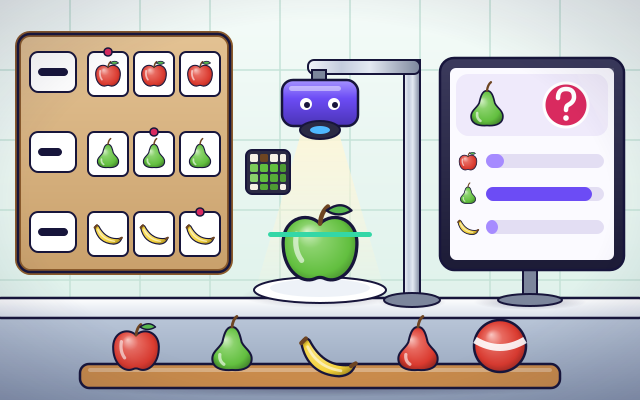
- An apple sits under a camera, and the computer names it: apple. It was never told about this exact apple. So how can a computer look at a picture and say what is in it?
- The computer does not see an apple. It gets a grid of tiny squares called pixels, and each pixel is just numbers that say how much red, green and blue it has.
- From the pixels, the computer picks out patterns called features: colors, edges, shapes and textures. Our simple machine uses just two: the main color and the shape of the outline.
- Nobody wrote rules for what an apple looks like. Instead, people collected many photos and labeled each one: apple, pear, banana. The computer studied these examples. They are called its training data.
- For a new photo, the machine compares its features with the examples it learned from and gives each label a score. The highest score wins. It is a best guess, with a number that says how sure it is.
- Here is a green apple. Every apple in the training photos was red, so the machine says pear, and it is very sure! The fix is better training data: examples of every kind. People must test for mistakes like this.
Look closely at an image recognizer
This simple machine names fruit. Tap each part to see what it does.
- Camera. The camera takes a photo of the fruit. Light, angle and background all change the picture, which can change the answer.
- Pixels. The photo is a grid of tiny squares called pixels. Each one is stored as numbers for red, green and blue. That grid of numbers is all the computer gets.
- Features. Patterns that the computer pulls out of the pixels. This machine uses two: the main color and the shape of the outline.
- Training photos. The labeled examples the machine learned from. People chose the photos and wrote the labels. Whatever is missing here, the machine has never seen.
- Scores. A score for each label, showing how well the photo matches the examples for that label. The scores add up to 100 percent.
- Answer. The label with the highest score. The machine can only choose from the labels it was trained on, so it has no way to say 'that is a ball'.
Train it, test it
Tap each fruit to test the machine. Find the one it gets wrong. Then label the new photos to teach it, and watch it look again.
Experiment: The machine has only ever seen red apples. What will it say about a green apple?
- Tap the red apple, the pear and the banana. Does it get them right?
- Tap the green apple. What does it say, and how sure is it?
- Label the three new photos, and watch the machine look at the green apple again.
What we found: It said pear, and it was very sure. The machine matches new photos to what it has seen, so a kind of apple it never saw fooled it. After it saw green apples with the right label, it got the answer right.
Turn on JavaScript to try it yourself.
Investigate the mistakes
The machine makes mistakes on the tray. Tap the fruits to test it and find out why. You have time to label only 2 baskets of photos: choose them, then press Train and test.
How a computer learns to name pictures
Image recognition lets a computer look at a picture and say what is in it. Phones use it to sort your photos, apps use it to name plants and birds, and recycling plants use it to sort bottles. It can seem as if the computer sees the way you do, but it works very differently.
To a computer, a picture is a grid of tiny squares called pixels, and each pixel is only numbers for how much red, green and blue it has. The program looks for patterns in those numbers: colors, edges, shapes and textures. These patterns are called features. Then it compares the features with what it learned from its training data: a huge pile of photos that people labeled one by one.
For a new photo it gives every label a score and picks the highest. That is a best guess, not knowledge. The machine can only choose from the labels it was taught, and it can only recognize the kinds of things it was shown. Our fruit machine saw only red apples, so a green apple fooled it, and it was very sure of its wrong answer.
Mistakes like that matter. If a program that looks at people was trained on photos that left some kinds of people out, it will make more mistakes about them, and that is unfair. So the people who build these systems must collect varied examples, test carefully, and fix what they find. For anything important, a person should check the computer's answer. Our picture book comparison only goes so far: a child understands what a cat is, while the program only matches patterns.
Key words
- Pixel
- One tiny square of a digital picture, stored as numbers for red, green and blue.
- Feature
- A pattern the computer measures in a picture, such as a color, an edge or a shape.
- Label
- The name given to a picture, such as apple. People write the labels for training photos.
- Training data
- The labeled examples that a program learns from.
- Classifier
- A program that sorts things into a fixed set of labels.
- Confidence
- A score for how well a picture matches what the program learned. A high score can still be wrong.
- Bias
- Unfair or lopsided results that come from training data that leaves things out.
Check your thinking
-
How does an image recognition program learn?
Show the answer
From many photos that people labeled. It studies labeled examples and finds the patterns that go with each label.
-
Why did the machine call a green apple a pear?
Show the answer
Every apple in its training photos was red, so green looked like the pears. The machine matched the green color to the only green fruit it had seen. The mistake came from its training photos.
-
The machine says 'pear, 99% sure'. What does the 99% really mean?
Show the answer
The photo strongly matches the pears it has seen. It can still be wrong. The score says how much the photo looks like its examples. It was 99% sure about the green apple, and wrong.
-
You show the fruit machine a toy ball. What can it answer?
Show the answer
Only one of the labels it was taught, so it will be wrong. It was taught apple, pear and banana. It has no other words, so it picks the closest one.
-
A program that looks at people's faces was trained mostly on photos of some kinds of people. What can go wrong?
Show the answer
It makes more mistakes about people who were missing from its training photos. Just like the green apple, anyone left out of the training photos is recognized less well. That is unfair, so builders must test and fix it.
You're a Computers & communication expert!
You watched, looked inside, tried it, solved the challenge and went deeper. Pick another question below, or switch the age at the top to see this topic another way.
More about computers & communication
 #341
Computers & communication
How does a chatbot create replies?
Explore a simplified word-prediction model and compare outputs for different questions.
#341
Computers & communication
How does a chatbot create replies?
Explore a simplified word-prediction model and compare outputs for different questions.
 #342
Computers & communication
How do map apps choose routes?
Compare routes using distance, closures, and travel time on a model network.
#342
Computers & communication
How do map apps choose routes?
Compare routes using distance, closures, and travel time on a model network.
 #343
Computers & communication
How does Bluetooth connect nearby devices?
Pair virtual gadgets and investigate communication as they move farther apart.
#343
Computers & communication
How does Bluetooth connect nearby devices?
Pair virtual gadgets and investigate communication as they move farther apart.
 #344
Computers & communication
How do walkie-talkies let people talk?
Select matching channels and follow voice signals between transmitters and receivers.
#344
Computers & communication
How do walkie-talkies let people talk?
Select matching channels and follow voice signals between transmitters and receivers.
Keep exploring
Games to play next
- Pixel StudioMake pixel art square by square, with mirror tools and a frame strip.
- Robot RoutesSnap together arrow, repeat and dance blocks to guide Bolt the robot home.
- Bug DetectiveA robot program almost works. Run it, spot the buggy block, and fix it.
Guide for grown-ups
- How to start homeschooling: a step-by-step guide for familiesA guide for parents · 7 min read
Coding games by grade
Computer skills worksheets by grade
- Preschool Computer Skills Worksheets
- Pre-K Computer Skills Worksheets
- Kindergarten Computer Skills Worksheets
- 1st Grade Computer Skills Worksheets
- 2nd Grade Computer Skills Worksheets
- 3rd Grade Computer Skills Worksheets
- 4th Grade Computer Skills Worksheets
- 5th Grade Computer Skills Worksheets
- 6th Grade Computer Skills Worksheets
- 7th Grade Computer Skills Worksheets
- 8th Grade Computer Skills Worksheets