How do walkie-talkies let people talk?
A walkie-talkie turns your voice into radio waves on one channel, and turns the waves it catches on that channel back into sound.
The big idea: When you press the button, a walkie-talkie turns your voice into a radio wave on its channel and sends it out from the antenna. Any radio nearby that is set to the same channel catches the wave and turns it back into sound. Radios on other channels hear nothing.
It's like tuning a radio to a station: the air is full of signals, but your radio plays only the channel it is set to. A walkie-talkie can send on it too.
The interactive parts didn't load. The explanations below still work; try reloading the page.
How a walkie-talkie carries your voice
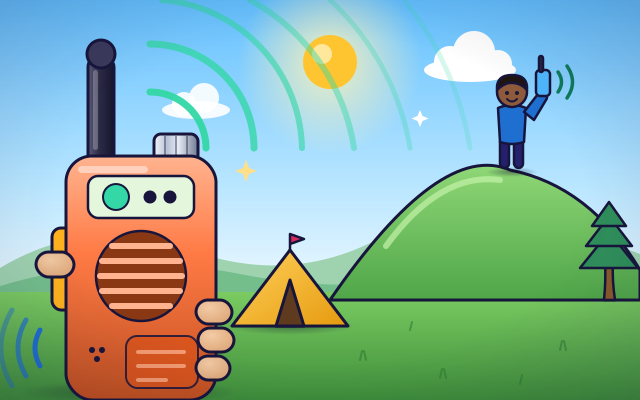
- Maya is by the tent and Sam is up on the hill, too far away to shout. Maya presses a button, speaks, and Sam hears her from his walkie-talkie at once. No wires and no phone network. How does it work?
- Maya holds down the talk button. Her voice is a sound wave: wiggles in the air. A tiny microphone turns those wiggles into an electrical signal with the same pattern.
- Inside, the radio makes a radio wave that is special to its channel. The voice signal is loaded onto that wave by changing its shape a little, so the wave carries the voice with it.
- The antenna sends the radio waves out in all directions. They travel at the speed of light, so they cross the campsite in far less than a blink.
- Lots of radio waves reach Sam's antenna. His radio keeps only the ones on its channel. Because it is set to the same channel as Maya's, it catches her wave, pulls the voice signal off it, and the speaker turns that into sound.
- A walkie-talkie cannot talk and listen at the same time. Maya says 'over' and lets go of the button. Then Sam presses his button to answer. If both talk at once, the waves mix into a jumble.
Look inside a walkie-talkie
This walkie-talkie is cut open. Tap each part to see what it does.
- Talk button. The push-to-talk button. Hold it down and the radio sends. Let go and it listens again.
- Microphone. The microphone turns the sound of your voice into an electrical signal with the same wiggly pattern.
- Transmitter. The transmitter makes the radio wave for your channel and loads your voice signal onto it.
- Antenna. The antenna sends your radio waves out into the air. When you are listening, the same antenna catches waves from other radios.
- Channel knob. This knob chooses the channel. Each channel is a different radio wave. Two radios can only talk when they are set to the same channel.
- Receiver. The receiver keeps only the waves on your channel and throws the rest away. Then it pulls the voice signal back off the wave.
- Speaker. The speaker turns the electrical voice signal back into sound by pushing the air with a small cone.
- Battery. The battery powers everything. Talking uses much more power than listening, because sending radio waves takes energy.
Channel lab
Press the talk button and see who hears you. Tap the knob to change your channel, or tap a friend to change theirs. Who hears you when the channels match, and when they do not?
Experiment: You talk on channel 2. Ben's radio is on channel 2 and Cleo's is on channel 3. Who hears you?
- Press the talk button. Look at Ben and Cleo. Does anyone hear you?
- Tap the knob until your channel matches Ben's. Talk again.
- Tap Cleo to put her on your channel too. Now who hears you?
- Switch on 'Ben talks at the same time'. What happens to the message?
What we found: Your waves reach everyone nearby, but only a radio set to the same channel turns them back into your voice. Other channels stay silent. And when two radios send on one channel at the same time, the waves mix, so nobody understands. That is why you take turns.
Turn on JavaScript to try it yourself.
Find a free channel
Other groups are using some channels. Find a channel where nobody is talking, put yourself and all three friends on it, then press Call.
Two-way radio, one channel
A walkie-talkie is two machines in one box: a transmitter, which sends, and a receiver, which listens. When you hold the talk button, the microphone turns your voice into an electrical signal. The transmitter loads that signal onto a radio wave and the antenna sends the wave out in every direction.
Radio waves are invisible and travel at the speed of light. The air around you is full of them, from radio stations, phones and many other things. They do not get mixed up, because each one has its own frequency, which means how many times the wave wiggles each second. A channel on a walkie-talkie is simply one chosen frequency.
Your friend's radio catches all sorts of waves with its antenna, but its receiver keeps only the ones on its channel. If that is your channel, it pulls your voice signal off the wave and sends it to the speaker. If it is set to a different channel, your wave is ignored. That is why everyone in a group must choose the same channel.
A walkie-talkie uses one channel for talking and for listening, so it cannot do both at once. You press to talk and let go to listen, and you say 'over' when you finish. Anyone on the same channel can hear you, so it is not private. Our radio-station comparison breaks down here: a station only sends and your home radio only receives, but each walkie-talkie does both, in turns.
Key words
- Transmitter
- The part of a radio that makes radio waves and sends them out.
- Receiver
- The part of a radio that catches radio waves and turns them back into sound.
- Channel
- One chosen radio frequency. Radios must share a channel to talk to each other.
- Frequency
- How many times a wave wiggles each second. It is measured in hertz.
- Modulation
- Changing a radio wave slightly so that it carries a voice or other signal.
- Half-duplex
- A link that works in both directions, but only one direction at a time.
Check your thinking
-
Your radio is on channel 3. Your friend's is on channel 5. What happens when you talk?
Show the answer
Your friend hears nothing, because the channels are different. A radio only turns waves on its own channel into sound. Waves on other channels are ignored.
-
Why do people using walkie-talkies say 'over'?
Show the answer
To show they have finished, so the other person can press and talk. Only one person can talk at a time on a channel, so 'over' means: your turn.
-
What does the microphone in a walkie-talkie do?
Show the answer
It turns the sound of your voice into an electrical signal. The microphone makes an electrical copy of the sound, which the transmitter can put onto a radio wave.
-
Two friends both press their talk buttons at the same moment on the same channel. What do the listeners hear?
Show the answer
A jumble, because the two signals mix. A channel can carry one voice at a time. Two signals on it at once spoil each other.
-
Your friend is on your channel but is walking behind a big hill. What is likely to happen?
Show the answer
The signal gets weak or disappears, because the hill blocks the waves. These radio waves travel in nearly straight lines. A hill in the way blocks most of the signal, even on the right channel.
You're a Computers & communication expert!
You watched, looked inside, tried it, solved the challenge and went deeper. Pick another question below, or switch the age at the top to see this topic another way.
More about computers & communication
 #345
Computers & communication
How do undersea cables carry information?
Trace light signals through a cutaway cable connecting distant coastlines.
#345
Computers & communication
How do undersea cables carry information?
Trace light signals through a cutaway cable connecting distant coastlines.
 #346
Computers & communication
How do phone towers pass along a moving call?
Move a phone between coverage areas and watch its connection transfer.
#346
Computers & communication
How do phone towers pass along a moving call?
Move a phone between coverage areas and watch its connection transfer.
 #347
Computers & communication
How do spam filters recognize unwanted messages?
Sort fictional messages using clues and compare correct detections with mistakes.
#347
Computers & communication
How do spam filters recognize unwanted messages?
Sort fictional messages using clues and compare correct detections with mistakes.
 #348
Computers & communication
How do computers store letters and emojis?
Match characters to numerical codes and turn stored codes back into symbols.
#348
Computers & communication
How do computers store letters and emojis?
Match characters to numerical codes and turn stored codes back into symbols.
Keep exploring
Games to play next
- Robot RoutesSnap together arrow, repeat and dance blocks to guide Bolt the robot home.
- Bug DetectiveA robot program almost works. Run it, spot the buggy block, and fix it.
- Safe Message DetectiveRead made-up messages, pop-ups and posts, spot the clues, and choose the safe, kind thing to do.
Guide for grown-ups
- How to start homeschooling: a step-by-step guide for familiesA guide for parents · 7 min read
Coding games by grade
Computer skills worksheets by grade
- Preschool Computer Skills Worksheets
- Pre-K Computer Skills Worksheets
- Kindergarten Computer Skills Worksheets
- 1st Grade Computer Skills Worksheets
- 2nd Grade Computer Skills Worksheets
- 3rd Grade Computer Skills Worksheets
- 4th Grade Computer Skills Worksheets
- 5th Grade Computer Skills Worksheets
- 6th Grade Computer Skills Worksheets
- 7th Grade Computer Skills Worksheets
- 8th Grade Computer Skills Worksheets