How does animation turn pictures into movement?
Animation shows many still pictures quickly, one after another. Your brain joins them into movement.
The big idea: No picture in a cartoon ever moves. Each one is a little different from the last, and when they change quickly your brain joins them into smooth movement.
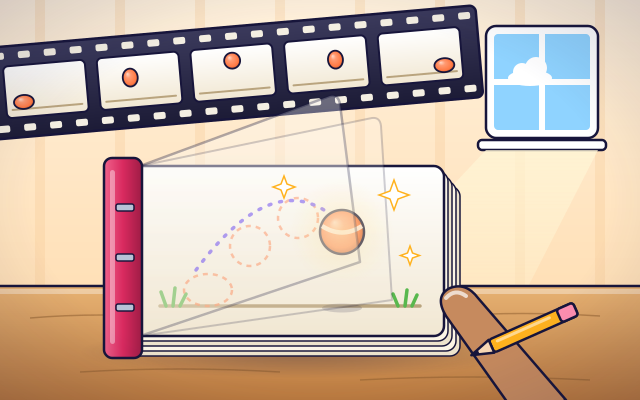
It's like a flipbook: each page is a still drawing, a tiny bit different from the last. Flip fast, and your brain sees one moving picture.
The interactive parts didn't load. The explanations below still work; try reloading the page.
How still pictures seem to move
- Zoe has drawn a ball on every page of a small pad. When she flips the pages with her thumb, the ball seems to hop across the paper. But every page is just a drawing that stays still. So where does the movement come from?
- Lay the pages side by side and the secret shows. Each page is one still picture, called a frame. From one frame to the next, the ball has moved just a little. No single frame moves at all.
- Show the frames slowly, and you see separate pictures: the ball jumps from spot to spot. Speed up to about twelve pictures each second, and something changes. You stop seeing pictures and start seeing one ball that moves.
- The movement is made inside your head. Your eyes send each picture to your brain. When similar pictures arrive quickly, one after another, your brain decides it is watching one thing that moves, and it fills in the gaps for you.
- Animators control speed with spacing. If the ball moves only a tiny step between frames, it looks slow. If it moves a big step, it looks fast. The frames still change at the same rate; only the size of the step is different.
- Every cartoon, movie and video game uses this trick. A movie shows twenty-four frames every second, so one minute needs one thousand four hundred and forty of them. Animators draw the important poses, and helpers or computers make the frames in between.
Look closely at an animator's tools
This drawing tablet holds one short hop. Tap each part to see what it does.
- Frame. One still picture. An animation is made of many frames, each a little different from the one before.
- Timeline. The row of frames in order, from first to last. The marker shows which frame is on screen right now.
- Onion skin. A faint copy of the frame before and the frame after. It shows the animator how far to move things in the new drawing. On paper, a light table does the same job.
- Key frames. The most important poses, like the start of the hop, the highest point and the landing. Animators draw these first to plan the motion.
- In-betweens. The frames between the key frames. They carry the ball smoothly from one pose to the next. More in-betweens make a move slower and smoother.
- Frame rate. How many frames are shown each second. A low frame rate looks jerky. A high one looks smooth, but needs many more pictures.
Flipbook lab
Choose the star of your scene, then change how many pictures are shown each second. Tap a drawing in the strip to stop on it.
Experiment: How fast must the pictures change before the ball seems to move smoothly?
- Start at 2 pictures each second. Can you see each drawing?
- Slide slowly up. Stop when the star first seems to move by itself.
- Go as fast as you can, then tap a drawing in the strip to prove that it is still.
What we found: At a few pictures each second you see separate drawings. At about 10 to 12 or more, your brain joins them into smooth movement, even though every drawing is still.
Turn on JavaScript to try it yourself.
Put the frames in order
Six drawings of a frog's hop are shuffled. Put them in order, from take-off to landing, then press Play. Get it right on your first Play for 3 stars.
Why still pictures seem to move
Animation is a trick, and the trick happens inside your head. A flipbook, a cartoon, a movie and a video game all do the same thing: they show you a still picture, then another one that is a tiny bit different, then another, very quickly. Each picture is called a frame.
If the frames change slowly, you see them one at a time, like a slide show. But when about ten or twelve frames go by each second, your brain stops seeing separate pictures. It notices that the ball in this frame is close to where the ball was in the last one, decides it must be the same ball, and shows you smooth movement. The movement is your brain's best guess about what happened between the pictures.
Animators use this in clever ways. To make something look slow, they move it only a little from frame to frame. To make it look fast, they move it a lot. They draw the most important poses first, called key frames, and then the in-between frames that join them. A ball that squashes when it lands and stretches as it flies looks heavy and bouncy, even though it is only ink or pixels.
All this takes a lot of pictures. A movie shows 24 frames every second, so one minute needs 1,440 frames. That is why many hand-drawn cartoons show each drawing twice, and why computers now help by working out many of the in-between frames. The flipbook comparison only goes so far: a movie is shown at an exact, steady speed, which your thumb cannot quite manage.
Key words
- Frame
- One still picture in an animation.
- Frame rate
- How many frames are shown each second, written as frames per second (fps).
- Apparent motion
- Movement that your brain sees when still pictures change quickly, although nothing really moves.
- Key frame
- A drawing of an important pose, such as the start, the highest point or the end of a move.
- In-between
- A frame drawn or calculated between two key frames to join them smoothly.
- Spacing
- How far something moves from one frame to the next. Bigger spacing looks faster.
- Onion skin
- A faint view of the frames before and after, which helps the animator place the next drawing.
Check your thinking
-
What is an animation really made of?
Show the answer
Many still pictures shown quickly, one after another. Every frame is a still picture. Showing them quickly, in order, is what makes the movement.
-
You show the frames at 2 each second. What do you see?
Show the answer
Separate pictures, with the ball jumping from spot to spot. At 2 frames each second your brain has time to see every picture by itself. It needs about 10 to 12 each second to join them.
-
Where does the movement in a flipbook really happen?
Show the answer
In your brain, which joins the still pictures together. Nothing on the pages moves. Your brain sees similar pictures arrive quickly and decides it is one thing moving.
-
A ball should look faster, with the same number of pictures each second. What should the animator do?
Show the answer
Move it a bigger step between frames. A bigger step in the same time means more distance each second, and that looks fast.
-
A movie shows 24 frames each second. How many frames does one minute need?
Show the answer
1,440. 24 frames × 60 seconds = 1,440 frames.
-
Why do animators usually draw the key frames before the in-betweens?
Show the answer
The keys fix the important poses and the timing, so the in-betweens only have to connect them. Planning the extremes first settles what happens and when. The in-betweens then fill in the path, by hand or by software.
You're a Computers & communication expert!
You watched, looked inside, tried it, solved the challenge and went deeper. Pick another question below, or switch the age at the top to see this topic another way.
More about computers & communication
 #337
Computers & communication
How does a screen reader describe a webpage?
Navigate spoken headings, links, and image descriptions on a sample page.
#337
Computers & communication
How does a screen reader describe a webpage?
Navigate spoken headings, links, and image descriptions on a sample page.
 #338
Computers & communication
How does speech recognition turn sound into words?
Follow a simplified journey from sound patterns to written text.
#338
Computers & communication
How does speech recognition turn sound into words?
Follow a simplified journey from sound patterns to written text.
 #339
Computers & communication
How does a translation app change languages?
Translate sample sentences and explore how context affects meaning.
#339
Computers & communication
How does a translation app change languages?
Translate sample sentences and explore how context affects meaning.
 #340
Computers & communication
How does image recognition identify objects?
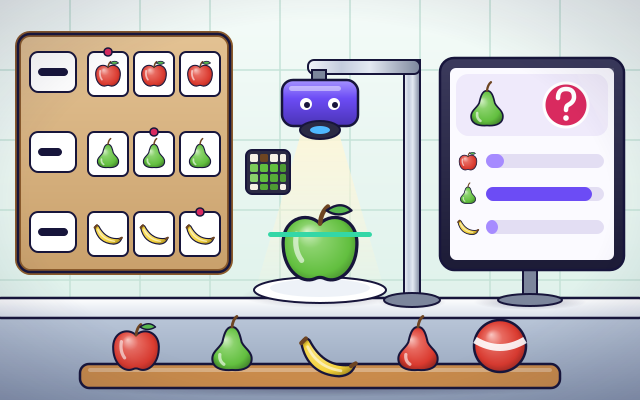
Label pictures, test a simple classifier, and investigate its mistakes.
#340
Computers & communication
How does image recognition identify objects?
Label pictures, test a simple classifier, and investigate its mistakes.
Keep exploring
Games to play next
- Animation DeskDraw frames, turn on onion skin and play your animation.
- Pixel StudioMake pixel art square by square, with mirror tools and a frame strip.
- Robot RoutesSnap together arrow, repeat and dance blocks to guide Bolt the robot home.
Guide for grown-ups
- How to start homeschooling: a step-by-step guide for familiesA guide for parents · 7 min read
Coding games by grade
Computer skills worksheets by grade
- Preschool Computer Skills Worksheets
- Pre-K Computer Skills Worksheets
- Kindergarten Computer Skills Worksheets
- 1st Grade Computer Skills Worksheets
- 2nd Grade Computer Skills Worksheets
- 3rd Grade Computer Skills Worksheets
- 4th Grade Computer Skills Worksheets
- 5th Grade Computer Skills Worksheets
- 6th Grade Computer Skills Worksheets
- 7th Grade Computer Skills Worksheets
- 8th Grade Computer Skills Worksheets