How does cloud storage keep files available?
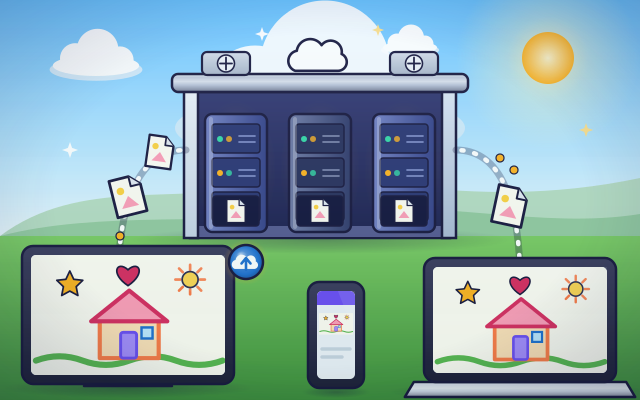
The cloud is not in the sky. It is a building full of computers that keeps copies of your files, ready for any of your devices.
The big idea: Saving to the cloud sends a copy of your file over the internet to computers in a faraway building. Any device that signs in to your account can ask for that copy.
It's like a locker you can open from any building in town with your own key. Your things stay in one safe place, and you fetch them wherever you are.
The interactive parts didn't load. The explanations below still work; try reloading the page.
From your tablet to the cloud and back
- Leo has drawn a picture on his tablet at home. Tomorrow he wants to show it on a laptop at school, but the tablet is staying at home. How can the drawing get there?
- Leo taps Save. The tablet sends a copy of the drawing over the internet, in small pieces, to a building far away. The drawing also stays on the tablet.
- People call it the cloud, but it is really a huge building called a data center. Inside are rows of computers called servers. Their drives hold files for millions of people.
- The servers do not keep just one copy. They store the drawing on several different machines. If one machine breaks, another still has it, so the drawing is not lost.
- At school, Leo signs in to his account on a laptop. The laptop asks the servers for the drawing, and they send a copy back. It took only a moment.
- When Leo adds a sun on the tablet, the change is sent up to the servers. Then every device that opens the drawing gets the new version. This is called syncing.
Look inside cloud storage
Tap each part, from Leo's tablet to the copies kept on the servers.
- Your device. A file starts on your own device. Saving to the cloud sends a copy away, and the device usually keeps its own copy too.
- Account. Your account is like your own key. When you sign in, the servers know which files are yours and show them only to you and the people you share with.
- Internet link. Files travel to and from the data center over the internet, cut into small packets. A big file or a slow connection means a longer wait.
- Data center. A data center is a building made for computers. It has strong power supplies, cooling to carry away heat, and guards and locks to keep the machines safe.
- Server. A server is a computer with no screen or keyboard. It waits for requests such as save this or send me that, and answers them all day and night.
- Storage drive. Inside each server are drives that remember data even when the power is off. Your drawing is stored there as a very long row of ones and zeros.
- Extra copies. The same drawing is stored on several servers. If one breaks, the others still have it, and the service quietly makes a new copy to replace the missing one.
One drawing, three devices
Decorate the drawing and save it to the cloud. Open it on the school laptop and on Grandma's phone. Then switch the tablet off and try again.
Experiment: You save your drawing to the cloud, then switch the tablet off. Can the school laptop still open the drawing?
- Add a sticker or two to the drawing.
- Tap the cloud button on the tablet to save.
- Switch the tablet off.
- Tap the school laptop. Does the drawing open?
What we found: Yes! Saving sent a copy to the servers in the data center. The laptop never talks to the tablet at all. It asks the servers, so it does not matter whether the tablet is on, off or far away.
Turn on JavaScript to try it yourself.
The newest drawing, everywhere
Leo added a star, but his tablet's Wi-Fi is off. Get the newest drawing, with the star, onto the school laptop and Grandma's phone.
Where your files really live
The word cloud makes it sound as if your files float in the sky. They do not. They sit on computers called servers, inside big buildings called data centers. People say cloud because you do not need to know which building or which computer: you just ask, and your file comes.
When you save a drawing to the cloud, your device sends a copy over the internet. The servers store it on drives, and they make extra copies on other machines. So if one machine breaks, which happens every day in a big data center, your drawing is still safe on another.
To get your files back, you sign in to your account. That is how the servers know the files are yours. Then any device, a laptop at school or a phone at Grandma's house, can ask for a copy. If you change the drawing, the new version is sent up, and the other devices fetch it. That is called syncing.
The cloud has limits. You need an internet connection to reach it, a big file takes a while to send, and your account must be kept safe with a strong password. The locker idea is not perfect either: a locker holds one thing, but the cloud keeps several copies and hands out as many more as you ask for.
Key words
- Cloud
- Computers in faraway data centers that store files and run programs for you over the internet.
- Server
- A computer with no screen that stores things and answers requests from other computers.
- Data center
- A building full of servers, with its own power, cooling and fast internet connections.
- Upload and download
- Uploading sends a copy from your device to the servers. Downloading brings a copy back.
- Sync
- Keeping the same newest version of a file on all your devices.
- Redundancy
- Keeping extra copies so nothing is lost when one machine breaks.
Check your thinking
-
Where is a file that you saved to the cloud?
Show the answer
On servers in a data center. The cloud is a nickname for servers in data centers.
-
You saved a drawing to the cloud from a tablet. The tablet's battery is empty. Can a laptop open the drawing?
Show the answer
Yes. The laptop gets its copy from the servers, not from the tablet. Once it is saved, the servers hold a copy. Other devices ask the servers.
-
Why do the servers keep several copies of your file?
Show the answer
So the file is not lost if one machine breaks. Machines break every day in a big data center. Extra copies keep your file safe.
-
Why do you sign in before you can see your files?
Show the answer
So the servers know which files are yours and keep them from strangers. Your account is your key. Only you, and people you share with, can open your files.
-
A 60 megabyte video is uploaded over a link that sends 2 megabytes each second. About how long does it take?
Show the answer
About 30 seconds. Time is size divided by speed: 60 divided by 2 is 30 seconds.
-
You change your drawing on the tablet while it has no internet. What does the school laptop show?
Show the answer
The old drawing, until the tablet connects and sends the change. The change cannot leave the tablet without a connection. The servers still hold the old version.
You're a Computers & communication expert!
You watched, looked inside, tried it, solved the challenge and went deeper. Pick another question below, or switch the age at the top to see this topic another way.
More about computers & communication
 #334
Computers & communication
How do backups recover lost files?
Save copies, change a pretend folder, and restore an earlier version.
#334
Computers & communication
How do backups recover lost files?
Save copies, change a pretend folder, and restore an earlier version.
 #335
Computers & communication
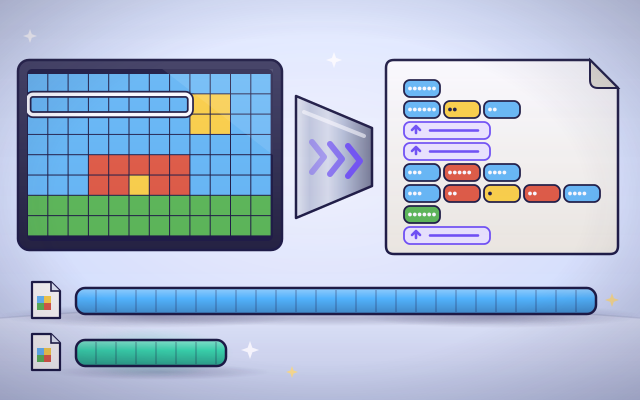
How does file compression make files smaller?
Replace repeated patterns with shorter descriptions and compare file sizes.
#335
Computers & communication
How does file compression make files smaller?
Replace repeated patterns with shorter descriptions and compare file sizes.
 #336
Computers & communication
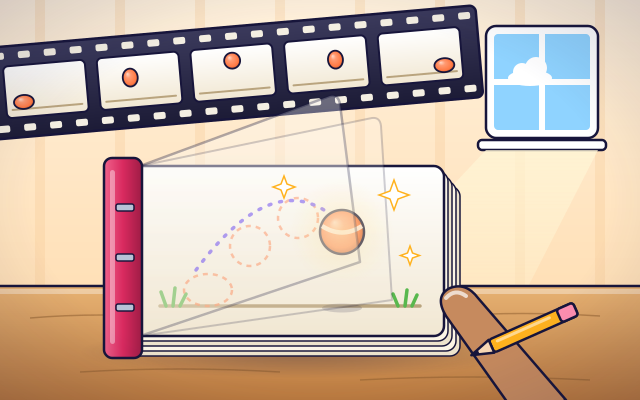
How does animation turn pictures into movement?
Arrange frames, change playback speed, and create a short animated scene.
#336
Computers & communication
How does animation turn pictures into movement?
Arrange frames, change playback speed, and create a short animated scene.
 #337
Computers & communication
How does a screen reader describe a webpage?
Navigate spoken headings, links, and image descriptions on a sample page.
#337
Computers & communication
How does a screen reader describe a webpage?
Navigate spoken headings, links, and image descriptions on a sample page.
Keep exploring
Games to play next
- Robot RoutesSnap together arrow, repeat and dance blocks to guide Bolt the robot home.
- Bug DetectiveA robot program almost works. Run it, spot the buggy block, and fix it.
- Safe Message DetectiveRead made-up messages, pop-ups and posts, spot the clues, and choose the safe, kind thing to do.
Guide for grown-ups
- How to start homeschooling: a step-by-step guide for familiesA guide for parents · 7 min read
Coding games by grade
Computer skills worksheets by grade
- Preschool Computer Skills Worksheets
- Pre-K Computer Skills Worksheets
- Kindergarten Computer Skills Worksheets
- 1st Grade Computer Skills Worksheets
- 2nd Grade Computer Skills Worksheets
- 3rd Grade Computer Skills Worksheets
- 4th Grade Computer Skills Worksheets
- 5th Grade Computer Skills Worksheets
- 6th Grade Computer Skills Worksheets
- 7th Grade Computer Skills Worksheets
- 8th Grade Computer Skills Worksheets