How does file compression make files smaller?
Files are full of repeats. Compression swaps each repeat for a shorter description, and the file can be rebuilt exactly.
The big idea: Compression looks for patterns that repeat and writes them in a shorter way, such as "8 blue" instead of eight blue squares. Unpacking follows the short notes and rebuilds the file exactly.
It's like a recipe that says "stir 20 times" instead of writing the word stir twenty times. It is shorter, and you still stir exactly 20 times.
The interactive parts didn't load. The explanations below still work; try reloading the page.
How a file gets smaller
- Sam made a picture and wants to send it to a friend. But the file is big, so it would travel slowly and fill up storage. Can the same picture be written in less space?
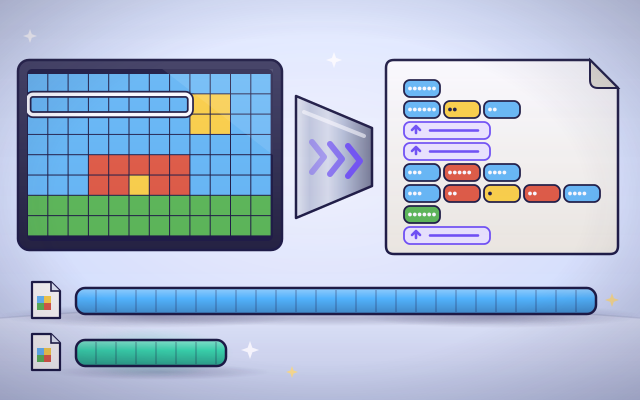
- Look closely at one row of the picture. The file lists every square one by one: blue, blue, blue, blue, blue, blue. It says the same thing again and again.
- Instead of listing every square, count each run of one color: six blue, two yellow, four blue. Twelve squares became three short notes.
- Whole rows repeat too. When a row is just like one that came earlier, the note can simply say: same as that row. That is even shorter.
- The short notes are sent instead of the big list. The friend's device follows them step by step and rebuilds the picture, exactly the same as before. Nothing was lost.
- Photos have very few exact repeats. So photo files round nearly equal colors to the same color first. You can hardly see the change, but now there are repeats to squash.
Pack a file, step by step
Press Next to follow one picture from a long list to a short note and back.
- The original file. The picture is a grid of colored squares. The plain file lists the color of every square: 96 squares, 96 entries.
- Look for repeats. The program reads along each row and watches for a color that keeps going. A stretch of one color is called a run.
- Write the counts. For each run it writes two things: how many squares, and which color. A run of twelve squares costs the same as a run of two.
- Reuse repeated lines. If a whole row matches an earlier row, the note says which one to copy. That costs just one entry.
- Compare the sizes. Now compare. The packed file has far fewer entries than the original, so it is quicker to send and takes less room.
- Unpack. To unpack, the program reads each note and paints that many squares. The picture comes back exactly, square for square.
Which picture squashes best?
Press Squash, then try the other pictures or paint your own. Which pictures shrink a lot, and which do not shrink at all?
Experiment: Which picture will shrink the most when you squash it?
- Press Squash on the stripes picture and read the two sizes.
- Choose the confetti picture. What happened to the size?
- Paint a few squares in the stripes picture and watch the notes change.
- Press Unpack to check that the picture comes back the same.
What we found: The stripes shrink the most, because each long run of one color becomes a single short note. The confetti does not shrink at all: it actually gets bigger, because with no repeats every square needs its own count. Compression only works when there is something repeated to describe.
Turn on JavaScript to try it yourself.
Squash it to fit
Each picture must be squashed small enough to fit in the message. Choose how to read it, then press Squash. Three pictures!
Shorter ways to say the same thing
A computer file is a very long list of numbers. In a simple picture file there is a number for the color of every single square, even when thousands of squares in a row are the same blue sky. All that repeating is wasteful, and compression is the art of saying the same thing in less space.
The simplest trick is counting. Instead of blue, blue, blue, blue, blue, blue, write 6 blue. A stretch of one color is called a run, so this trick is called run-length encoding. A second trick is to notice bigger patterns. If a whole row, a word or a phrase has appeared before, the file can just point back to it: same as before. Zip files use this trick.
To open the file again, the computer reads the short notes and follows them. It gets back exactly what was there before, with nothing missing. That is why this kind is called lossless. It is used for writing, programs and drawings, where every detail matters.
Compression cannot shrink everything. A picture where every square differs from its neighbors has no repeats to describe, so the notes come out longer than the picture. And you cannot squash a file again and again: once the repeats are gone, there is nothing left to remove. Photos and music use a different trick and throw away tiny details you would not notice, which makes them much smaller but not exactly the same.
Key words
- Compression
- Writing the same information using less space.
- Run
- A stretch of the same thing repeated in a row, such as six blue squares.
- Run-length encoding
- Writing how many and which color for each run, instead of listing every square.
- Lossless
- Compression that can be undone exactly: the unpacked file is identical to the original.
- Lossy
- Compression that leaves out tiny details to save a lot of space. The result is close, but not exactly the same.
- Redundancy
- Saying the same thing more than once. It is what compression removes.
Check your thinking
-
How could you write blue, blue, blue, blue, blue, blue, blue, blue in a shorter way?
Show the answer
8 blue. A count and a color describe the whole run, and nothing is lost.
-
Which picture shrinks the most with run-length encoding?
Show the answer
A flag with three wide stripes. Wide stripes are long runs, and each long run becomes one short note.
-
You unpack a losslessly compressed drawing. How does it compare with the original?
Show the answer
It is exactly the same, square for square. Lossless means nothing is lost. The notes rebuild every square.
-
Why does a confetti picture get bigger when you squash it by counting runs?
Show the answer
There are no repeats, so every square needs a count as well as a color. With nothing repeated, the notes say 1 red, 1 blue, 1 green, which is longer than the squares themselves.
-
Why are photos usually saved with lossy compression?
Show the answer
Photos have few exact repeats, so leaving out tiny details saves far more space. Nearly equal colors are rounded to equal ones, which creates runs and patterns to compress.
-
A row of 60 pixels has 5 runs. Stored as counts and values, how many numbers does it need, and what is the compression ratio?
Show the answer
10 numbers, so the ratio is 6 to 1. Each run needs a count and a value: 5 times 2 is 10. The ratio is 60 divided by 10, which is 6.
You're a Computers & communication expert!
You watched, looked inside, tried it, solved the challenge and went deeper. Pick another question below, or switch the age at the top to see this topic another way.
More about computers & communication
 #336
Computers & communication
How does animation turn pictures into movement?
Arrange frames, change playback speed, and create a short animated scene.
#336
Computers & communication
How does animation turn pictures into movement?
Arrange frames, change playback speed, and create a short animated scene.
 #337
Computers & communication
How does a screen reader describe a webpage?
Navigate spoken headings, links, and image descriptions on a sample page.
#337
Computers & communication
How does a screen reader describe a webpage?
Navigate spoken headings, links, and image descriptions on a sample page.
 #338
Computers & communication
How does speech recognition turn sound into words?
Follow a simplified journey from sound patterns to written text.
#338
Computers & communication
How does speech recognition turn sound into words?
Follow a simplified journey from sound patterns to written text.
 #339
Computers & communication
How does a translation app change languages?
Translate sample sentences and explore how context affects meaning.
#339
Computers & communication
How does a translation app change languages?
Translate sample sentences and explore how context affects meaning.
Keep exploring
Games to play next
- Robot RoutesSnap together arrow, repeat and dance blocks to guide Bolt the robot home.
- Bug DetectiveA robot program almost works. Run it, spot the buggy block, and fix it.
- Safe Message DetectiveRead made-up messages, pop-ups and posts, spot the clues, and choose the safe, kind thing to do.
Guide for grown-ups
- How to start homeschooling: a step-by-step guide for familiesA guide for parents · 7 min read
Coding games by grade
Computer skills worksheets by grade
- Preschool Computer Skills Worksheets
- Pre-K Computer Skills Worksheets
- Kindergarten Computer Skills Worksheets
- 1st Grade Computer Skills Worksheets
- 2nd Grade Computer Skills Worksheets
- 3rd Grade Computer Skills Worksheets
- 4th Grade Computer Skills Worksheets
- 5th Grade Computer Skills Worksheets
- 6th Grade Computer Skills Worksheets
- 7th Grade Computer Skills Worksheets
- 8th Grade Computer Skills Worksheets