How does encryption keep messages private?
Encryption scrambles a message with a key. On the way it looks like nonsense, and only someone with the right key can turn it back.
The big idea: A rule and a secret key change every letter of a message. Anyone can see the scrambled message, but only a person who knows the key can undo the change.
It's like a secret language you and a friend invent: other people can hear every word, but only the two of you know what the words mean.
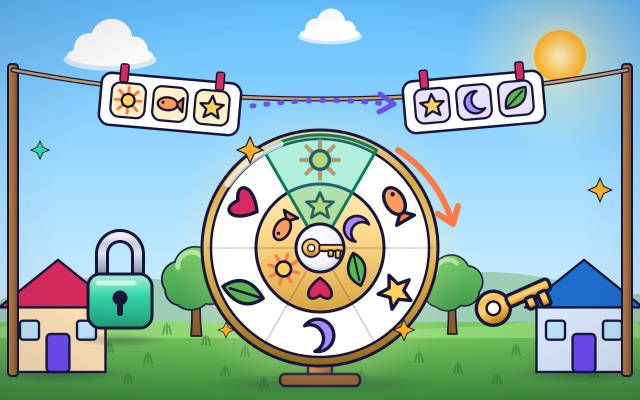
The interactive parts didn't load. The explanations below still work; try reloading the page.
How a key hides a message
- Zara sends Leo a note along the line. On the way it passes Rocco the raccoon, and he can read every word. Messages on the internet pass many strangers too.
- Zara turns her code wheel by her secret key, the number 3. Every letter slides 3 places along the alphabet. H becomes K, and E becomes H.
- The scrambled note travels along the line. Rocco peeks again, but now it is just a jumble of letters. He can see it, yet he cannot understand it.
- Leo knows the key too. He slides every letter 3 places back, and the real message appears. Zara and Leo agreed on the key earlier, in private.
- Rocco guesses a key and tries 5 instead of 3. He gets a different jumble. But this little code has only 25 keys, so he could try them all in a minute.
- Real encryption works the same way, with far cleverer scrambling and keys so huge that all the computers in the world could not try them all. Your phone does it for you when you see a padlock.
Look inside a secret message
Tap each part of the picture, from Zara's note to Leo's.
- The message. This is the message Zara wants to send. Before it is scrambled, anyone who sees it can read it.
- The key. The key is a secret number. Here it says how many places to slide each letter. Zara and Leo both know it, and nobody else does.
- Code wheel. The wheel is the rule. The outer ring has the real letters and the inner ring shows what each one turns into. Turning the inner ring by the key lines them up.
- Scrambled message. This is the scrambled message. It hangs on the line where anyone can look, but it reads as nonsense without the key.
- The line. The line is the path between Zara and Leo. Like the internet, it passes other people, so anything sent along it should be scrambled first.
- Leo's side. Leo uses the same key to slide every letter back. With the right key he reads the message. With a wrong key he gets a different jumble.
Scramble and unscramble
Turn the wheel or move the slider to set Zara's key. Watch the note on the line change. Then set Leo's key and see what he reads.
Experiment: Zara scrambles the note with key 3. Leo tries key 5. What does Leo read?
- Set Zara's key to 3. Look at the note on the line.
- Set Leo's key to 5. What does he read?
- Now set Leo's key to 3.
What we found: With the wrong key Leo gets a different jumble, not the message. Only the same key that scrambled the note can turn it back. That is why the key must stay a secret between Zara and Leo.
Turn on JavaScript to try it yourself.
Leo forgot the key
A pretend note from Zara has arrived, and Leo forgot the key. Zara always starts with HELLO. Find the key and press Unlock.
Keys, codes and padlocks
When you send a message, it does not fly straight to your friend. It hops through many computers that belong to other people. If the message were plain writing, any of them could read it. Encryption fixes that by scrambling the message before it leaves.
Scrambling needs two things: a rule and a key. The rule on this page is simple: slide every letter along the alphabet. The key is the secret number that says how far. The scrambled message can be seen by anybody, because it is nonsense without the key. Your friend, who knows the key, slides the letters back.
This sliding code is only a model, and a weak one. It has just 25 keys, so a patient raccoon could try them all. Real encryption mixes the message far more thoroughly and uses keys so huge that every computer on Earth, working together for billions of years, could not try them all.
Your phone and computer encrypt things for you all the time. The little padlock next to a web address means the page is scrambled on its journey. Encryption protects a message on the way. It cannot tell you whether the person at the other end is kind or honest, so keep asking a grown-up when something online feels wrong. Never share a password with anyone else. Secret codes are for keeping strangers out, never for keeping secrets from the grown-ups who look after you.
Key words
- Encryption
- Scrambling a message so that only someone with the key can read it.
- Key
- The secret that scrambles a message and turns it back.
- Ciphertext
- The scrambled form of a message.
- Brute force
- Trying every possible key, one after another.
- Shift cipher
- A simple code that slides every letter the same number of places along the alphabet.
- End-to-end encryption
- Encryption in which only the sender's and the receiver's devices hold the keys, so nobody in between can read the message.
Check your thinking
-
What does Leo need to turn the scrambled note back into the message?
Show the answer
The same key Zara used. Only the key that scrambled the note can undo the scrambling. A different key gives a different jumble.
-
Rocco copies a scrambled note from the line. What does he have?
Show the answer
Letters he can see but cannot understand without the key. Encryption does not hide the note. It hides what the note means. Without the key it is nonsense.
-
With a key of 3, which letter does A turn into?
Show the answer
D. Slide 3 places along the alphabet: A, then B, C, D. So A becomes D.
-
Why is the sliding code on this page too weak for real secrets?
Show the answer
It has only 25 keys, so someone can try them all. With so few keys, trying every one takes about a minute. Real keys have more possibilities than anyone could ever try.
-
Adding one bit to the length of a key does what to the number of possible keys?
Show the answer
Doubles it. Each bit is one more yes-or-no choice, so the count is 2 raised to the number of bits, and one extra bit doubles it.
You're a Computers & communication expert!
You watched, looked inside, tried it, solved the challenge and went deeper. Pick another question below, or switch the age at the top to see this topic another way.
More about computers & communication
 #331
Computers & communication
How does a video call work?
Follow pictures and sound through encoding, transmission, and playback between virtual devices.
#331
Computers & communication
How does a video call work?
Follow pictures and sound through encoding, transmission, and playback between virtual devices.
 #332
Computers & communication
How does streaming video reach a screen?
Fill a playback buffer and explore what happens when incoming data slows.
#332
Computers & communication
How does streaming video reach a screen?
Fill a playback buffer and explore what happens when incoming data slows.
 #333
Computers & communication
How does cloud storage keep files available?
Save a drawing remotely and retrieve it from different virtual devices.
#333
Computers & communication
How does cloud storage keep files available?
Save a drawing remotely and retrieve it from different virtual devices.
 #334
Computers & communication
How do backups recover lost files?
Save copies, change a pretend folder, and restore an earlier version.
#334
Computers & communication
How do backups recover lost files?
Save copies, change a pretend folder, and restore an earlier version.
Keep exploring
Games to play next
- Safe Message DetectiveRead made-up messages, pop-ups and posts, spot the clues, and choose the safe, kind thing to do.
- Robot RoutesSnap together arrow, repeat and dance blocks to guide Bolt the robot home.
- Bug DetectiveA robot program almost works. Run it, spot the buggy block, and fix it.
Guide for grown-ups
- How to start homeschooling: a step-by-step guide for familiesA guide for parents · 7 min read
Coding games by grade
Computer skills worksheets by grade
- Preschool Computer Skills Worksheets
- Pre-K Computer Skills Worksheets
- Kindergarten Computer Skills Worksheets
- 1st Grade Computer Skills Worksheets
- 2nd Grade Computer Skills Worksheets
- 3rd Grade Computer Skills Worksheets
- 4th Grade Computer Skills Worksheets
- 5th Grade Computer Skills Worksheets
- 6th Grade Computer Skills Worksheets
- 7th Grade Computer Skills Worksheets
- 8th Grade Computer Skills Worksheets