How does streaming video reach a screen?
A streamed movie arrives in small chunks. The player keeps a few seconds stored ahead so the picture never has to wait.
The big idea: A streaming player downloads the movie in chunks and stores a few seconds ahead in a buffer. If chunks arrive slower than the movie plays, the buffer empties and the movie pauses.
It's like a bathtub with the tap running and the plug out. Water in the tub is the buffer. If the tap slows to a trickle, the tub empties.
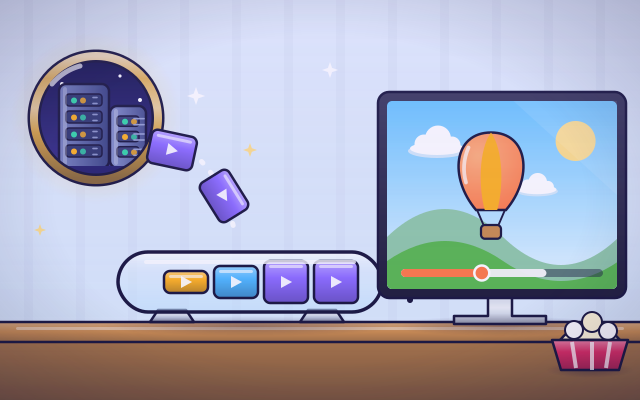
The interactive parts didn't load. The explanations below still work; try reloading the page.
How a movie reaches your screen
- Zoe and Ben press play, and the movie starts almost at once. But the movie is not stored in the TV. It sits on a computer far away. How does it arrive so fast?
- On the video server, the movie has been cut into short chunks, each a few seconds long. Every chunk is saved in several sizes: sharp and big, or blurry and small.
- The player asks for chunk one, then chunk two, then chunk three. Each one races through the internet's cables to the house.
- The player does not show each chunk the moment it lands. It keeps a few seconds stored ahead, called the buffer, and plays from the front while new chunks join the back.
- Now the connection slows down. Chunks arrive more slowly than the movie plays, so the buffer shrinks. When it is empty, the movie pauses and a spinning circle appears.
- A clever player sees the buffer shrinking and asks for smaller, blurrier chunks. They arrive in time, so the movie keeps playing. When the connection speeds up, it goes back to sharp ones.
Look inside a stream
Tap each part, from the faraway server to the bar under the picture.
- Video server. The movie is stored on powerful computers called servers, in a building far away. They send out chunks whenever a player asks for them.
- Chunk. A chunk is a few seconds of the movie, picture and sound together. The player asks for chunks one after another, in order.
- Home router. The router connects the house to the internet. Every device at home shares it, so a big download on one device leaves less for the others.
- Buffer. The buffer is the player's store of chunks that have arrived but not been shown yet. It keeps the movie going through short slowdowns.
- Player. The player un-squeezes each chunk and sends the pictures to the screen. It also decides which chunk to ask for next, and in which size.
- Screen. The screen shows the pictures from each chunk. Big chunks give a sharp picture. Small chunks give a fuzzier one, but they arrive faster.
- Progress bar. The colored part shows how much you have watched. The pale part just ahead is the buffer: movie that has arrived but not played yet.
Fill the buffer, drain the buffer
Change how fast data arrives and how sharp the picture is. Tap Sam's laptop to share the connection. Watch the buffer fill and drain.
Experiment: The buffer is full and the movie is playing. Then chunks start arriving more slowly than the movie plays. What happens?
- Slide the incoming data to fast and let the buffer fill.
- Tap Sam's laptop to start a big download, or slide to slow.
- Watch the buffer. When does the movie stop?
- Pick a smaller picture and see what changes.
What we found: The movie does not stop right away, because the buffer still holds a few seconds. It keeps playing until the buffer is empty, then pauses until a new chunk arrives. Smaller chunks arrive faster, so a small picture can keep playing on a slow connection.
Turn on JavaScript to try it yourself.
Movie without a pause
Play the whole movie with no pauses. Sam will start a big download in the middle. Change the picture size at the right moments to stay as sharp as you can.
Why movies sometimes stop to think
When you stream a movie, you never get the whole thing at once. The movie sits on a server far away, already cut into short chunks of a few seconds each. Your player asks for the first chunk, starts playing it, and at once asks for the next ones. That is why a movie can start a second or two after you press play.
The player keeps a few seconds of movie that have arrived but not played yet. This store is called the buffer. It works like water in a bathtub: chunks pour in from the internet, and the movie drains them out at a steady pace. If chunks arrive at least as fast as the movie plays, the buffer stays full and you never notice it.
Sometimes the connection slows down, perhaps because someone else at home starts a big download. Then chunks arrive more slowly than the movie uses them. The buffer shrinks, and when it is empty the movie has to pause. The spinning circle means: waiting for the next chunk.
To avoid that, every chunk is stored on the server in several sizes. Big chunks look sharp. Small chunks look fuzzier but arrive much faster. The player watches its buffer and picks the size that will arrive in time. The bathtub idea misses this part: a real player can ask for thinner water.
Key words
- Streaming
- Playing a video while it is still arriving, instead of downloading all of it first.
- Chunk (segment)
- A short piece of the movie, a few seconds long, that is sent on its own.
- Buffer
- The player's store of movie that has arrived but not been shown yet.
- Bitrate
- How much data each second of the movie needs. Sharper pictures need more.
- Stall (buffering)
- A pause in playback because the buffer is empty and the next chunk has not arrived.
- Adaptive bitrate
- Choosing bigger or smaller chunks to match how fast the connection is right now.
Check your thinking
-
How does a streamed movie arrive?
Show the answer
In short chunks, one after another. The movie is cut into chunks a few seconds long, and the player asks for them in order.
-
Chunks arrive more slowly than the movie plays. What happens to the buffer?
Show the answer
It shrinks, and when it is empty the movie pauses. The movie uses chunks faster than they arrive, so the store runs down.
-
Your movie starts pausing when your sister begins a big download. Why?
Show the answer
Both devices share the same connection, so fewer chunks reach the TV each second. Everything at home shares one connection through the router.
-
Why does a player sometimes make the picture fuzzier on purpose?
Show the answer
Smaller chunks arrive faster, so the movie does not have to stop. A fuzzy movie that keeps playing is better than a sharp one that keeps stopping.
-
A link carries 4 megabits per second and the video's bitrate is 2. Starting from an empty buffer, how much video is stored after 10 seconds of playing?
Show the answer
About 10 seconds. The fill rate is 4 divided by 2, which is 2 seconds of video per second. Playback uses 1, so the buffer gains 1 second each second.
-
What does the pale part of the progress bar, just ahead of where you are, show?
Show the answer
Movie that has already arrived and is waiting to play. That part is the buffer: chunks stored ahead of the play point.
You're a Computers & communication expert!
You watched, looked inside, tried it, solved the challenge and went deeper. Pick another question below, or switch the age at the top to see this topic another way.
More about computers & communication
 #333
Computers & communication
How does cloud storage keep files available?
Save a drawing remotely and retrieve it from different virtual devices.
#333
Computers & communication
How does cloud storage keep files available?
Save a drawing remotely and retrieve it from different virtual devices.
 #334
Computers & communication
How do backups recover lost files?
Save copies, change a pretend folder, and restore an earlier version.
#334
Computers & communication
How do backups recover lost files?
Save copies, change a pretend folder, and restore an earlier version.
 #335
Computers & communication
How does file compression make files smaller?
Replace repeated patterns with shorter descriptions and compare file sizes.
#335
Computers & communication
How does file compression make files smaller?
Replace repeated patterns with shorter descriptions and compare file sizes.
 #336
Computers & communication
How does animation turn pictures into movement?
Arrange frames, change playback speed, and create a short animated scene.
#336
Computers & communication
How does animation turn pictures into movement?
Arrange frames, change playback speed, and create a short animated scene.
Keep exploring
Games to play next
- Animation DeskDraw frames, turn on onion skin and play your animation.
- Mini-Game StudioMake a tiny game with rule blocks, test-play it, and share it once it can be won.
- Pixel StudioMake pixel art square by square, with mirror tools and a frame strip.
Guide for grown-ups
- How to start homeschooling: a step-by-step guide for familiesA guide for parents · 7 min read
Coding games by grade
Computer skills worksheets by grade
- Preschool Computer Skills Worksheets
- Pre-K Computer Skills Worksheets
- Kindergarten Computer Skills Worksheets
- 1st Grade Computer Skills Worksheets
- 2nd Grade Computer Skills Worksheets
- 3rd Grade Computer Skills Worksheets
- 4th Grade Computer Skills Worksheets
- 5th Grade Computer Skills Worksheets
- 6th Grade Computer Skills Worksheets
- 7th Grade Computer Skills Worksheets
- 8th Grade Computer Skills Worksheets