How does the internet send a message?
The internet splits every message into numbered packets, passes them from router to router, and puts them back together at the other end.
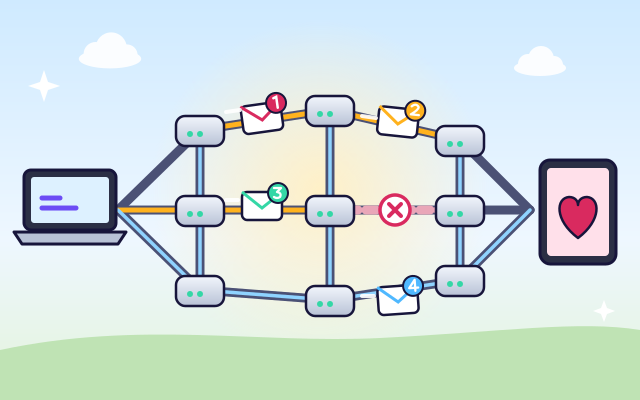
The big idea: The internet doesn't send a message in one piece. It cuts it into small numbered packets with an address on each. Routers pass the packets along, choosing a way that works. If a cable breaks, they go another way, and the numbers let the other computer put the message back in order.
It's like
The interactive parts didn't load. The explanations below still work; try reloading the page.
The journey of a message
- You type a message to Grandma, who lives far away, and press send. In less than a second it's on her screen. How does it travel so far, so fast?
- First the computer cuts the message into small pieces called packets. Each packet gets a label: where it's going, where it came from, and its number.
- Packets travel along cables to routers. A router is like a post office: it reads the address on each packet and sends it one step closer to Grandma.
- Packets from the same message don't always take the same road. When one cable is busy, a router can send a packet another way. So they may arrive out of order.
- Uh oh, a digger cut a cable! The routers notice and send packets another way. A packet that was on the cable is lost, so the computer sends a copy again.
- Grandma's tablet uses the numbers to put the packets back in order. When every piece is there, the message appears. It even sends back a note: got it!
The road from your home to the world
Your message passes through all of these. Tap each one to find out what it does.
- Your device. Your computer, tablet or phone cuts your message into packets and puts an address on each one.
- Home Wi-Fi router. Your home router talks to your devices with radio waves (Wi-Fi) and sends their packets out to the internet.
- Internet provider. Your internet provider connects your home to the rest of the internet and passes your packets on to other networks.
- Routers. Big routers sit where many cables meet. They read each packet's address and send it out along the best cable, millions of times a second.
- Fiber-optic cable. Long-distance cables are made of glass threads thinner than a hair. Your packets travel through them as super-fast flashes of light.
- Undersea cable. Cables on the ocean floor connect the continents. Most internet traffic between countries goes through them, not through space.
- Data center. Data centers are buildings full of powerful computers called servers. They store websites, videos and messages and send them out when asked.
- A packet. A packet is a small piece of your message. Its label says where it's going, where it came from and its number, so it can be put back in order.
Packets on the move
Send a message and watch the numbered packets. Then cut a cable while they're traveling. Do they still arrive? In what order?
Experiment: If a cable breaks while the packets are traveling, will the whole message still arrive?
- Press Send and watch the packets arrive.
- Press Send again, and press Cut a cable while they're traveling (or tap a cable).
- Look at the order the packets arrive in. Is the message complete?
What we found: The message still arrives! Routers send the packets around the broken cable. A packet that was on the cable when it broke is lost, so the computer sends it again. The numbers on the packets let Grandma's tablet put them back in the right order, even when they arrive mixed up.
Turn on JavaScript to try it yourself.
After the storm
A storm broke many cables and Grandma's message can't get through. You can fix only one cable. Fix the right one, then send the message.
Packets, routers and cables
When you send a message, a photo or a video call, your device cuts it into small pieces called packets. Each packet gets a label with the address it's going to, the address it came from and a number that says which piece it is.
Packets travel through cables, radio waves and even beams of light inside glass threads. Wherever cables meet, a router reads each packet's address and sends it one step closer to where it's going, a bit like a post office passing letters along.
The internet has lots of different routes between places. If one cable is busy, a router can send a packet another way. If a cable breaks, the routers find out and send everything around it. That's why the internet keeps working even when parts of it go wrong.
At the other end, the computer collects the packets and uses their numbers to put them back in order. It sends back a note to say which ones arrived. If a packet goes missing, the sender notices that no note came back and sends it again.
Key words
- Packet
- A small, labeled piece of a message.
- Router
- A device that reads packet addresses and sends them the right way.
- IP address
- A number that identifies a device on a network, like a street address.
- Route
- The path a packet takes through the network.
- Acknowledgment
- A note sent back to say a packet arrived.
- Fiber-optic cable
- A cable that carries data as pulses of light through thin glass fibers.
Check your thinking
-
Why does each packet have a number?
Show the answer
So the pieces can be put back in the right order. Packets can arrive mixed up. The numbers show the right order.
-
What happens when a cable on the route breaks?
Show the answer
Routers send the packets around it on another route. The internet has many routes, so routers pick one that still works.
-
What does a router do?
Show the answer
Reads a packet's address and sends it the right way. Routers pass packets one step closer to where they're going.
-
How does the sender know a packet got lost?
Show the answer
No note comes back to say it arrived. The receiver sends back notes for the packets it gets. A missing note means: send it again.
-
How do most messages travel between continents?
Show the answer
Through cables on the ocean floor. Undersea fiber-optic cables carry most intercontinental traffic. Satellites are used too, but they carry much less.
You're a Computers & communication expert!
You watched, looked inside, tried it, solved the challenge and went deeper. Pick another question below, or switch the age at the top to see this topic another way.
More about computers & communication
 #52
Computers & communication
How do robots work?
Give a robot sensors, motors, and instructions. Help it navigate a maze, avoid obstacles, or sort objects, then improve its behavior.
#52
Computers & communication
How do robots work?
Give a robot sensors, motors, and instructions. Help it navigate a maze, avoid obstacles, or sort objects, then improve its behavior.
 #53
Computers & communication
How do video games work?
Explore input, game rules, animation, collision detection, and scoring. Change gravity or movement speed in a tiny game and play the result.
#53
Computers & communication
How do video games work?
Explore input, game rules, animation, collision detection, and scoring. Change gravity or movement speed in a tiny game and play the result.
 #54
Computers & communication
How does a computer follow instructions?
Explore the processor, memory, storage, and input/output devices. Follow a simple instruction through the system and build a short sequence of commands.
#54
Computers & communication
How does a computer follow instructions?
Explore the processor, memory, storage, and input/output devices. Follow a simple instruction through the system and build a short sequence of commands.
 #55
Computers & communication
How does Wi-Fi connect devices?
Send simplified radio messages between a device and router. Move devices around a virtual home and investigate how distance and walls affect the connection.
#55
Computers & communication
How does Wi-Fi connect devices?
Send simplified radio messages between a device and router. Move devices around a virtual home and investigate how distance and walls affect the connection.
Keep exploring
Games to play next
- Safe Message DetectiveRead made-up messages, pop-ups and posts, spot the clues, and choose the safe, kind thing to do.
- Robot RoutesSnap together arrow, repeat and dance blocks to guide Bolt the robot home.
- Bug DetectiveA robot program almost works. Run it, spot the buggy block, and fix it.
Guide for grown-ups
- How to start homeschooling: a step-by-step guide for familiesA guide for parents · 7 min read
Coding games by grade
Computer skills worksheets by grade
- Preschool Computer Skills Worksheets
- Pre-K Computer Skills Worksheets
- Kindergarten Computer Skills Worksheets
- 1st Grade Computer Skills Worksheets
- 2nd Grade Computer Skills Worksheets
- 3rd Grade Computer Skills Worksheets
- 4th Grade Computer Skills Worksheets
- 5th Grade Computer Skills Worksheets
- 6th Grade Computer Skills Worksheets
- 7th Grade Computer Skills Worksheets
- 8th Grade Computer Skills Worksheets