How do robots work?
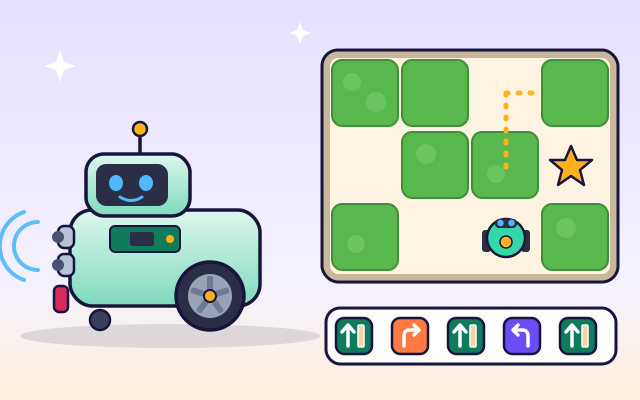
A robot senses the world, follows a program to decide what to do, and moves with motors. Give it instructions and help it through a maze!
The big idea: A robot follows instructions called a program. Its sensors tell it what's around it, its computer decides what to do, and its motors move it. Using sensors lets one program work in many different places.
It's like
The interactive parts didn't load. The explanations below still work; try reloading the page.
Sense, think, act
- Meet Bolt, a little robot. Like every robot, Bolt does three things over and over: it senses the world, it thinks about what to do, and then it acts.
- Bolt's sensors are like senses. The distance sensor sends out a sound too high for us to hear and times the echo. A bump switch feels a touch, and a light sensor sees lines on the floor.
- Inside Bolt is a small computer called a controller. It follows a program, a list of instructions, one step at a time, and it can check its sensors to decide what to do next.
- Electric motors turn the wheels through gears. When both wheels spin forward, Bolt goes straight. When one goes forward and the other goes backward, Bolt turns on the spot.
- Here's Bolt's program: go until you see a wall, turn right, go until you see a wall, turn left. Because it uses its sensor, Bolt knows when to stop, however long each hallway is.
- Robots don't always get it right the first time. Bolt drove too fast and bumped the wall. Engineers test, find the problem, change the program, and test again.
Inside a wheeled robot
Tap each part of Bolt. Some of them move or light up when you find them!
- Distance sensor. The distance sensor sends out a squeak of sound too high for us to hear, then listens for the echo. The longer the echo takes, the farther away the wall is.
- Bump switch. The bumper at the front presses a tiny switch when Bolt touches something. It's Bolt's sense of touch.
- Line sensor. Under Bolt, a little light shines on the floor. A light sensor measures how much bounces back: lots on white floor, little on a dark line.
- Controller. The controller is a small computer. It reads the sensors, follows the program and tells the motors what to do, many times every second.
- Battery. The rechargeable battery stores energy for the motors, the sensors and the controller.
- Motors and gears. Each wheel has its own electric motor. Gears slow the fast-spinning motor down and make it stronger, so it can push the robot.
- Wheels. Two big wheels drive Bolt. Spin them the same way to go straight, or opposite ways to turn on the spot. A little caster wheel keeps Bolt balanced.
- Wheel encoder. A disk with slots spins with the wheel. A light shines through the slots and the controller counts the flashes to know how far Bolt has rolled.
Program Bolt
Bolt already knows a program that uses its sensor. Run it in Maze A and Maze B. Then clear it and build your own with Forward and Turn blocks. Does it work in both mazes?
Experiment: A program made only of Forward and Turn blocks works in Maze A. Will the same program work in Maze B, which has longer hallways?
- Run Bolt's sensor program in Maze A, then in Maze B.
- Press Clear and build a program with Forward and Turn blocks that solves Maze A.
- Switch to Maze B and run your program again. What happens?
What we found: Counting steps only works if you already know exactly how long every hallway is. A program that says “go until the sensor sees a wall” works in both mazes, because the robot checks the real world as it goes. That's why robots have sensors!
Turn on JavaScript to try it yourself.
Battery hunt
Program Bolt to pick up the battery and reach the charger. Use as few blocks as you can.
Sensors, programs and motors
A robot is a machine that can sense the world around it, decide what to do and then do it, all by itself. Robots vacuum floors, build cars, explore Mars and even help doctors.
Robots sense with sensors. A distance sensor sends out a sound too high for us to hear and times its echo, the way a bat does. A bump switch feels when the robot touches something. Light sensors can see lines on the floor, and cameras can see colors and shapes.
A robot's brain is a small computer called a controller. It follows a program, which is a list of instructions written by people. Instructions can repeat (loops) and can make choices using sensors: “If you see a wall, turn.” Programs that use sensors can handle places the programmer never saw.
Robots move with motors. In a wheeled robot, each wheel has its own motor. Both forward means straight, and one forward and one backward means a spin. Engineers rarely get everything right the first time. They test the robot, watch what goes wrong, change the program and test again.
Key words
- Sensor
- A part that lets a robot notice something, like distance, touch or light.
- Program
- A list of instructions that a computer follows.
- Motor
- A machine that turns electrical energy into spinning motion.
- Loop
- Instructions that repeat, for example “keep going until you see a wall”.
- Feedback
- Using sensor information to change what the robot does next.
- Stopping distance
- How far a robot rolls after it decides to stop.
Check your thinking
-
What are the three jobs every robot does?
Show the answer
Sense, think, act. Sensors notice the world, the controller decides and motors act.
-
How does a two-wheeled robot turn on the spot?
Show the answer
One wheel spins forward and the other backward. Opposite wheel directions rotate the robot in place.
-
Why is “go until you see a wall” better than “forward 3 times”?
Show the answer
It works for hallways of any length. The robot checks the real hallway instead of guessing its length.
-
Your robot keeps bumping into walls. What do engineers do?
Show the answer
Test, find the problem, change the program and test again. Testing and improving step by step is how engineers make robots work.
-
An ultrasonic echo returns after 2.9 ms. About how far away is the wall? (Sound: 343 m/s)
Show the answer
About 50 cm. 343 m/s × 0.0029 s ≈ 1 m round trip, so the wall is about 0.5 m away.
You're a Computers & communication expert!
You watched, looked inside, tried it, solved the challenge and went deeper. Pick another question below, or switch the age at the top to see this topic another way.
More about computers & communication
 #53
Computers & communication
How do video games work?
Explore input, game rules, animation, collision detection, and scoring. Change gravity or movement speed in a tiny game and play the result.
#53
Computers & communication
How do video games work?
Explore input, game rules, animation, collision detection, and scoring. Change gravity or movement speed in a tiny game and play the result.
 #54
Computers & communication
How does a computer follow instructions?
Explore the processor, memory, storage, and input/output devices. Follow a simple instruction through the system and build a short sequence of commands.
#54
Computers & communication
How does a computer follow instructions?
Explore the processor, memory, storage, and input/output devices. Follow a simple instruction through the system and build a short sequence of commands.
 #55
Computers & communication
How does Wi-Fi connect devices?
Send simplified radio messages between a device and router. Move devices around a virtual home and investigate how distance and walls affect the connection.
#55
Computers & communication
How does Wi-Fi connect devices?
Send simplified radio messages between a device and router. Move devices around a virtual home and investigate how distance and walls affect the connection.
 #56
Computers & communication
How does GPS know where you are?
Compare signals from several satellites and watch a receiver calculate its position. Explore how signal timing helps locate a moving character.
#56
Computers & communication
How does GPS know where you are?
Compare signals from several satellites and watch a receiver calculate its position. Explore how signal timing helps locate a moving character.
Keep exploring
Games to play next
- Robot RoutesSnap together arrow, repeat and dance blocks to guide Bolt the robot home.
- Bug DetectiveA robot program almost works. Run it, spot the buggy block, and fix it.
- Safe Message DetectiveRead made-up messages, pop-ups and posts, spot the clues, and choose the safe, kind thing to do.
Guide for grown-ups
- How to start homeschooling: a step-by-step guide for familiesA guide for parents · 7 min read
Coding games by grade
Computer skills worksheets by grade
- Preschool Computer Skills Worksheets
- Pre-K Computer Skills Worksheets
- Kindergarten Computer Skills Worksheets
- 1st Grade Computer Skills Worksheets
- 2nd Grade Computer Skills Worksheets
- 3rd Grade Computer Skills Worksheets
- 4th Grade Computer Skills Worksheets
- 5th Grade Computer Skills Worksheets
- 6th Grade Computer Skills Worksheets
- 7th Grade Computer Skills Worksheets
- 8th Grade Computer Skills Worksheets