How does a printer make colorful pictures?
An inkjet printer builds every color from tiny dots of cyan, magenta, yellow and black ink.
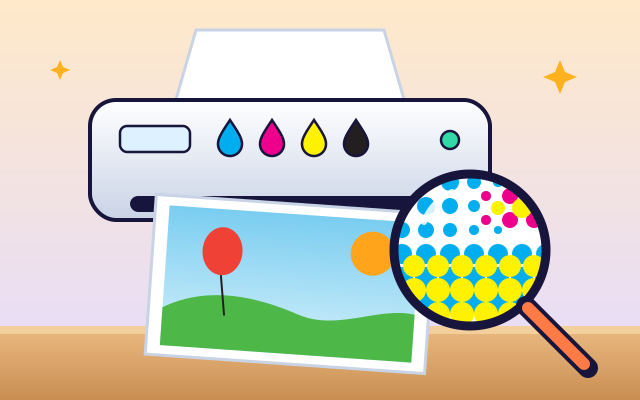
The big idea: An inkjet printer squirts tiny drops of four inks: cyan, magenta, yellow and black. The dots are so small that your eyes blend them, so a few dots of cyan and yellow together look green.
It's like
The interactive parts didn't load. The explanations below still work; try reloading the page.
How a printer paints with dots
- When you press print, the computer sends the picture to the printer. A roller pulls in a sheet of paper and the picture appears, stripe by stripe.
- Look through a magnifying glass and you'll see a secret: the picture is made of thousands of tiny colored dots.
- A color printer uses just four inks: cyan, magenta, yellow and black. Printers call them CMYK. K stands for black, the key color.
- When dots overlap or sit close together, the colors mix. Cyan and yellow make green, magenta and yellow make red, and cyan and magenta make blue.
- The printhead has hundreds of tiny holes called nozzles. A heater makes a little bubble that pushes out one drop of ink, thousands of times a second.
- The printhead zooms from side to side, spraying a stripe of dots. Then the paper moves forward a little, and it prints the next stripe, until the page is done.
Inside an inkjet printer
The lid is open! Tap each part of the printer and watch it move.
- Paper tray. The paper tray holds a stack of blank sheets. The printer takes one sheet at a time.
- Rollers. Rubber rollers grip the paper and pull it through the printer, moving it forward a tiny step after each stripe.
- Ink cartridges. The cartridges hold cyan, magenta, yellow and black ink. They ride along with the printhead.
- Printhead. The printhead slides back and forth on a metal rail, spraying ink exactly where the picture needs it.
- Nozzles. Under the printhead are hundreds of nozzles, each thinner than a hair. Each one can fire thousands of drops every second.
- Belt and motor. A motor turns a rubber belt, and the belt drags the printhead from one side of the page to the other.
- Output tray. The printed page slides out onto the output tray, where the ink dries in a few seconds.
- Control board. A circuit board receives the picture from the computer and tells the motors and nozzles exactly when to work.
Build a picture from CMYK dots
Turn inks off and on and print again. Drag the magnifier to see how dots of different colors build each part of the picture.
Experiment: What happens to the green hills if you switch off the yellow ink?
- Look at the hills with the magnifier: which dots make the green?
- Switch off yellow and print again.
- Try switching off cyan and magenta too. What changes?
What we found: The green hills are made of cyan dots and yellow dots side by side. Take away the yellow and only the cyan is left, so the hills turn blue. Every color in the picture is built from a mix of the four inks.
Turn on JavaScript to try it yourself.
Mix the right color
Mix the target color by choosing how much cyan, magenta and yellow ink to use. Print a sample and get as close as you can.
Dots, drops and colors
A screen makes colors by shining light, but paper doesn't glow. A printer makes colors by taking light away. White paper reflects all the colors of light. Each ink soaks up some colors and lets the others bounce back to your eyes.
Cyan ink soaks up red light, magenta soaks up green, and yellow soaks up blue. So where cyan and yellow overlap, red and blue are both soaked up, and only green bounces back. That's why cyan and yellow dots look green.
To make a light color, the printer uses small dots with lots of white paper between them. To make a strong color, it uses big dots that almost cover the paper. Your eyes blend the dots together, so you see smooth colors instead of dots.
An inkjet printer fires tiny drops through hundreds of nozzles while the printhead slides across the page. The paper moves up a little after each pass. It's like a very fast, very careful painter that only ever paints dots!
Key words
- CMYK
- Cyan, magenta, yellow and key (black): the four process inks.
- Halftone
- A picture made of dots of different sizes, which your eyes blend into smooth colors.
- Nozzle
- A tiny hole in the printhead that fires drops of ink.
- Subtractive color
- Making colors by soaking up (taking away) some colors of light, as inks and paints do.
- Resolution
- How many dots fit in a small space. More dots means finer detail.
Check your thinking
-
If you look at a printed picture with a magnifying glass, what do you see?
Show the answer
Tiny dots of a few colors. Printers build pictures from tiny dots of cyan, magenta, yellow and black.
-
Which two inks make green?
Show the answer
Cyan and yellow. Cyan and yellow mix to make green.
-
Why do printers have black ink, even though C, M and Y can make dark colors?
Show the answer
Black is darker and crisper, and saves the colored inks. Mixing C, M and Y makes a muddy brown and uses lots of ink. One black dot is darker and cheaper.
-
How does a printer make a light pink instead of a strong magenta?
Show the answer
Smaller magenta dots with more white paper between them. Small dots let lots of white paper show through, so the color looks lighter.
-
How many inks does a color inkjet printer usually use?
Show the answer
Four: cyan, magenta, yellow and black. Four inks, mixed as tiny dots, can make thousands of colors.
You're a Computers & communication expert!
You watched, looked inside, tried it, solved the challenge and went deeper. Pick another question below, or switch the age at the top to see this topic another way.
More about computers & communication
 #58
Computers & communication
How do microphones and speakers work?
Watch sound vibrations become an electrical signal and turn back into vibrations. Compare quiet, loud, low-pitched, and high-pitched sounds.
#58
Computers & communication
How do microphones and speakers work?
Watch sound vibrations become an electrical signal and turn back into vibrations. Compare quiet, loud, low-pitched, and high-pitched sounds.
 #326
Computers & communication
How do QR codes store information?
Encode a short message into a square pattern and decode it onscreen.
#326
Computers & communication
How do QR codes store information?
Encode a short message into a square pattern and decode it onscreen.
 #327
Computers & communication
How does a search engine find websites?
Build a miniature index and compare which pages match different searches.
#327
Computers & communication
How does a search engine find websites?
Build a miniature index and compare which pages match different searches.
 #328
Computers & communication
How do passwords protect accounts?
Explore how a system checks fictional passwords without displaying stored secrets.
#328
Computers & communication
How do passwords protect accounts?
Explore how a system checks fictional passwords without displaying stored secrets.
Keep exploring
Games to play next
- Pixel StudioMake pixel art square by square, with mirror tools and a frame strip.
- Robot RoutesSnap together arrow, repeat and dance blocks to guide Bolt the robot home.
- Bug DetectiveA robot program almost works. Run it, spot the buggy block, and fix it.
Guide for grown-ups
- How to start homeschooling: a step-by-step guide for familiesA guide for parents · 7 min read
Coding games by grade
Computer skills worksheets by grade
- Preschool Computer Skills Worksheets
- Pre-K Computer Skills Worksheets
- Kindergarten Computer Skills Worksheets
- 1st Grade Computer Skills Worksheets
- 2nd Grade Computer Skills Worksheets
- 3rd Grade Computer Skills Worksheets
- 4th Grade Computer Skills Worksheets
- 5th Grade Computer Skills Worksheets
- 6th Grade Computer Skills Worksheets
- 7th Grade Computer Skills Worksheets
- 8th Grade Computer Skills Worksheets