How do passwords protect accounts?
A password proves you are you. The computer does not keep your password. It keeps a scrambled pattern and checks each new try against it.
The big idea: When you set a password, a scrambler turns it into a pattern and only the pattern is saved. Each time you log in, your typing is scrambled again. If the two patterns match, you are let in.
It's like baking a cake: the same recipe always makes the same cake, but nobody can turn a cake back into eggs and flour.
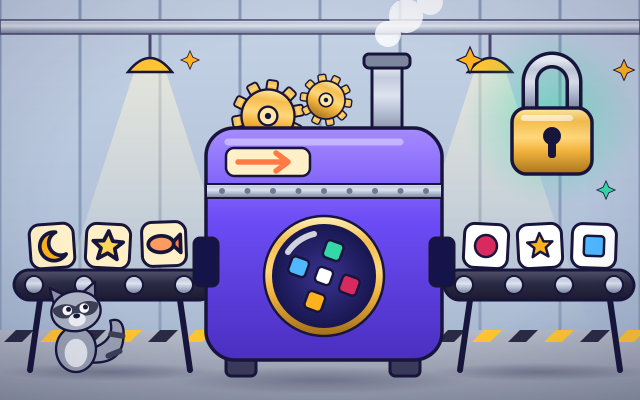
The interactive parts didn't load. The explanations below still work; try reloading the page.
How a computer checks a password
- Zara types the password for her pretend owl club account. The screen shows only dots, so nobody can peek. But how does the computer check her secret?
- Inside the computer, the password drops into a scrambler. Out comes a pattern of blocks. The same password always makes exactly the same pattern.
- The computer writes the pattern in its account book next to Zara's name. Then it throws the password away. The book holds patterns, never passwords.
- At the next login the computer scrambles what Zara types and compares the new pattern with the saved one. A match opens the lock. One wrong letter gives a completely different pattern.
- Suppose a sneaky raccoon peeks at the book. He finds only patterns, and the scrambler cannot run backward. All he can do is guess words and scramble each one.
- A long password has so many possibilities that guessing takes ages. Use a different one for each account, never share it with friends, and ask a grown-up to help you keep it safe.
Look inside a login
Tap each part of the login machine. It is a model: in a real computer these parts are programs.
- Password box. You type your password here. The screen shows dots instead of letters, so someone looking over your shoulder cannot read it.
- The scrambler. The scrambler mixes up the password and turns it into a pattern. It always makes the same pattern from the same password, and it cannot be run backward.
- The pattern. This pattern is the password's fingerprint. Change just one letter of the password and the whole pattern changes.
- A pinch of salt. Before scrambling, the computer adds a few random letters called salt, different for every person. Then two people who pick the same password still get different patterns.
- Account book. The account book lists each person's name with the pattern of their password. The password itself is never written down, so even the people who run the computer cannot read it.
- The matcher. The matcher compares the new pattern with the saved one. If every block is the same, the lock opens. If any block is different, it stays shut.
Scramble, save and compare
Pick a pretend password and press Log in. Watch the scrambler make its pattern and the matcher compare it with the saved one. Then try a word with one letter changed.
Experiment: The saved password is moon. You log in with moom, just one letter different. What will its pattern look like?
- Choose moon and press Log in. The patterns match.
- Choose moom and press Log in.
- Compare the new pattern with the saved one, block by block.
What we found: One changed letter makes a completely different pattern. That is why the computer cannot tell you that you were close, and why a guesser cannot work toward the answer step by step. These short words are only for the experiment: a real password should be long.
Turn on JavaScript to try it yourself.
Build a strong pretend password
Tap word tiles to build a pretend password for Zara. Make it take the guesser more than 100 years. Then press Test it.
Why the computer does not keep your password
A password is a secret that only you know. When you type it correctly, the computer believes it is really you. But a list of everyone's passwords would be a dangerous thing to keep, because anyone who stole the list could get into every account.
So careful computers do not keep passwords at all. They push each password through a scrambler and keep only the scrambled pattern. The scrambler always makes the same pattern from the same password, but it only works in one direction, like baking a cake. When you log in, your typing is scrambled again and the two patterns are compared.
If a thief steals the patterns, the only thing left to do is guess: try a word, scramble it and see whether the pattern matches. Short words and obvious choices such as a pet's name or 1234 are guessed in a blink. A long password has so many possibilities that guessing would take longer than a lifetime.
That gives three simple rules. Make your password long: a few unrelated words work well. Use a different password for every account. And never tell it to friends or type it into a page you do not trust. A parent or another grown-up you trust can help you choose passwords and keep them safe.
Key words
- Password
- A secret that you type to prove who you are.
- Hash
- The scrambled pattern a computer makes from a password. It cannot be turned back into the password.
- Salt
- A few random letters mixed in before scrambling, different for every person.
- Guessing attack
- Trying one password after another until one works.
- Passphrase
- A password made of several words. It is long, which makes it strong, and still easy to remember.
Check your thinking
-
What does a careful computer save when you choose a password?
Show the answer
Only a scrambled pattern of the password. Only the pattern is saved. Then nobody who reads the book can see your password.
-
Which pretend password would take a guesser the longest?
Show the answer
purple-tiger-kite-noodle. It is by far the longest, and it is not something a guesser would think of first. Names and 1234 are tried right away.
-
You type one wrong letter in your password. Why can the computer not say you were close?
Show the answer
One changed letter makes a completely different pattern. The computer only has patterns, and patterns of similar words look nothing alike.
-
A friend asks for your game password so they can play as you. What is the best answer?
Show the answer
No, a password is only for me and my grown-up. A password only protects you while nobody else knows it. A parent or trusted grown-up may help you look after it.
-
A password uses only the 26 lowercase letters. How many times more possibilities does it have if you add one more letter?
Show the answer
26 times more. The count is 26 raised to the power of the length, so each extra letter multiplies it by 26.
You're a Computers & communication expert!
You watched, looked inside, tried it, solved the challenge and went deeper. Pick another question below, or switch the age at the top to see this topic another way.
More about computers & communication
 #329
Computers & communication
How does two-step verification protect accounts?
Unlock a pretend account using two proofs and explore their separate roles.
#329
Computers & communication
How does two-step verification protect accounts?
Unlock a pretend account using two proofs and explore their separate roles.
 #330
Computers & communication
How does encryption keep messages private?
Scramble a message in a simple model and restore it using the appropriate key.
#330
Computers & communication
How does encryption keep messages private?
Scramble a message in a simple model and restore it using the appropriate key.
 #331
Computers & communication
How does a video call work?
Follow pictures and sound through encoding, transmission, and playback between virtual devices.
#331
Computers & communication
How does a video call work?
Follow pictures and sound through encoding, transmission, and playback between virtual devices.
 #332
Computers & communication
How does streaming video reach a screen?
Fill a playback buffer and explore what happens when incoming data slows.
#332
Computers & communication
How does streaming video reach a screen?
Fill a playback buffer and explore what happens when incoming data slows.
Keep exploring
Games to play next
- Safe Message DetectiveRead made-up messages, pop-ups and posts, spot the clues, and choose the safe, kind thing to do.
- Robot RoutesSnap together arrow, repeat and dance blocks to guide Bolt the robot home.
- Bug DetectiveA robot program almost works. Run it, spot the buggy block, and fix it.
Guide for grown-ups
- How to start homeschooling: a step-by-step guide for familiesA guide for parents · 7 min read
Coding games by grade
Computer skills worksheets by grade
- Preschool Computer Skills Worksheets
- Pre-K Computer Skills Worksheets
- Kindergarten Computer Skills Worksheets
- 1st Grade Computer Skills Worksheets
- 2nd Grade Computer Skills Worksheets
- 3rd Grade Computer Skills Worksheets
- 4th Grade Computer Skills Worksheets
- 5th Grade Computer Skills Worksheets
- 6th Grade Computer Skills Worksheets
- 7th Grade Computer Skills Worksheets
- 8th Grade Computer Skills Worksheets