How do computers store letters and emojis?
Computers can only store numbers. So every letter, sign and emoji has its own number, kept as a row of on and off switches.
The big idea: A computer gives every character a number from a shared code book called Unicode. It stores the number as switches that are on or off, and turns it back into a shape on the screen.
It's like a wall of numbered lockers: every character lives in its own locker, and the computer only has to remember the locker number.
The interactive parts didn't load. The explanations below still work; try reloading the page.
From a key to a number
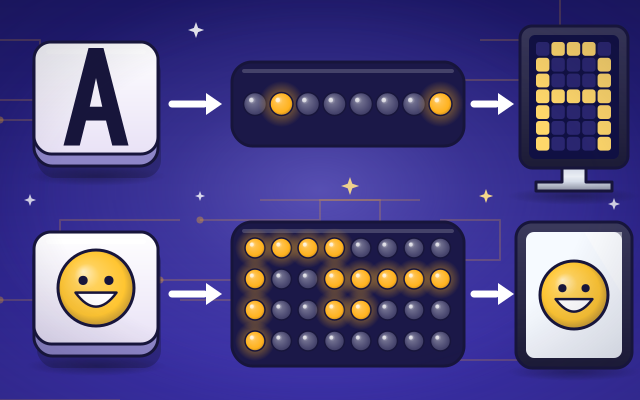
- Zoe presses the A key, and an A appears on her screen. But inside a computer there are no letters at all. There are only tiny switches that are on or off.
- The trick is a code book that everyone agrees on. It gives every character a number. Capital A is number 65, B is 66 and C is 67.
- The number is stored with eight switches. Each switch is worth a different amount: 64 and 1 are on, and 64 plus 1 makes 65. Eight switches are called a byte.
- To show the letter again, the computer reads the switches, gets 65 and looks it up. Then a font, which holds the shape of every letter, draws an A in tiny dots of light.
- Today's code book is called Unicode. It has a number for every letter in every language, and for signs and emoji too: about 150,000 characters so far.
- When Zoe sends a smiley, only its number travels, as four bytes of switches. Her friend's tablet uses the same code book, so it draws a smiley too.
From the key to the screen
Tap each stop to follow a letter from the keyboard to the screen.
- Keyboard. When you press a key, the keyboard sends a signal that says which key it was. The computer works out which character you mean.
- Code table. The code table lists every character next to its number. A is 65, B is 66, C is 67. Everyone uses the same list, called Unicode.
- Encoder. The encoder turns the number into bytes, each made of eight on or off switches. Plain letters need one byte. Emoji need more.
- Memory. Memory keeps the bytes as rows of tiny switches. A whole story is just a very long line of on and off.
- Font. A font is a collection of shapes, one for each character. The computer finds the shape that goes with the number.
- Screen. The screen lights up tiny dots called pixels in the shape of the letter. Now you can read it!
The code machine
Press a key to see its number and its switches. Then tap the lamps yourself to flip switches and make a new character.
Experiment: Capital A is stored as 65. How do you think small a is stored?
- Press the A key and read its number.
- Press the a key. Which lamp is different?
- Press A again, then tap the lamp worth 32 yourself.
What we found: Every character has its own number, and small a is 97, not 65. That is 65 plus 32, so capital and small letters differ by exactly one switch: the one worth 32. Flip it and A turns into a. The computer does not know they are the same letter. It only knows two numbers.
Turn on JavaScript to try it yourself.
Read the secret word
Five numbers are stored in memory. Press the right key for each one to read the secret word. A is 65.
How computers store text
Inside a computer there are no letters, pictures or sounds. There are only billions of tiny switches, and each one is either on or off. To store anything at all, the computer has to turn it into numbers, because numbers can be written with on and off switches.
For text, people made a code book that gives every character a number. Capital A is 65, B is 66 and so on. Small a is 97. Even a space has a number: 32. The digit 1 as a character is 49, which is not the same as the number one! When you type, the computer stores these numbers one after another.
A number is stored with switches that are each worth a different amount: 1, 2, 4, 8, 16, 32, 64 and 128. Add up the ones that are on and you have the number. Eight switches make a byte, and one byte is enough for the letters of English. Other characters need more. A smiley uses four bytes.
The code book used today is called Unicode. It has numbers for every alphabet in the world and for emoji. The numbered lockers picture is not perfect, though: a locker holds the thing itself, but the computer stores only the number. The shape comes from a font, which is why the same letter can look so different from one page to the next.
Key words
- Bit
- One tiny switch that is either on (1) or off (0).
- Byte
- Eight bits together. One byte can store a number from 0 to 255.
- Code point
- The number that the code book gives to a character. A is 65.
- Unicode
- The shared code book that gives a number to every character in every language, and to emoji.
- UTF-8
- The usual way to store Unicode numbers as bytes: one byte for plain letters and up to four for emoji.
- Font
- A set of shapes, one for each character, that the computer uses to draw text.
Check your thinking
-
What does a computer actually store when you type the letter A?
Show the answer
The number 65, as on and off switches. The code book says A is 65, and 65 is stored as eight switches.
-
A is 65 and B is 66. What number is E?
Show the answer
69. The letters are numbered in order: A 65, B 66, C 67, D 68, E 69.
-
The same letter looks curly on one page and plain on another. What changed?
Show the answer
The font: the number is the same, but a different shape is drawn. The computer stores only the number. A font decides what shape to draw for it.
-
Why does a smiley need more bytes than the letter A?
Show the answer
Its number is far too big to fit in one byte. One byte only goes up to 255. The smiley's number is 128,512, so it needs four bytes.
-
Why can a program jump into the middle of UTF-8 text and still find where a character starts?
Show the answer
The leading bits of each byte show whether it starts a character or continues one. A byte beginning 0 is a whole character, one beginning 11 starts a longer character, and one beginning 10 continues it.
You're a Computers & communication expert!
You watched, looked inside, tried it, solved the challenge and went deeper. Pick another question below, or switch the age at the top to see this topic another way.
More about computers & communication
 #349
Computers & communication
How can messages survive small transmission errors?
Damage an encoded message and use extra information to detect or repair errors.
#349
Computers & communication
How can messages survive small transmission errors?
Damage an encoded message and use extra information to detect or repair errors.
 #350
Computers & communication
How do computers sort large lists?
Try different sorting strategies and compare the number of steps required.
#350
Computers & communication
How do computers sort large lists?
Try different sorting strategies and compare the number of steps required.
 #49
Computers & communication
How does a camera take a picture?
Follow light through a lens to a sensor. Adjust focus and lighting, capture an image, and zoom in to discover its pixels.
#49
Computers & communication
How does a camera take a picture?
Follow light through a lens to a sensor. Adjust focus and lighting, capture an image, and zoom in to discover its pixels.
 #50
Computers & communication
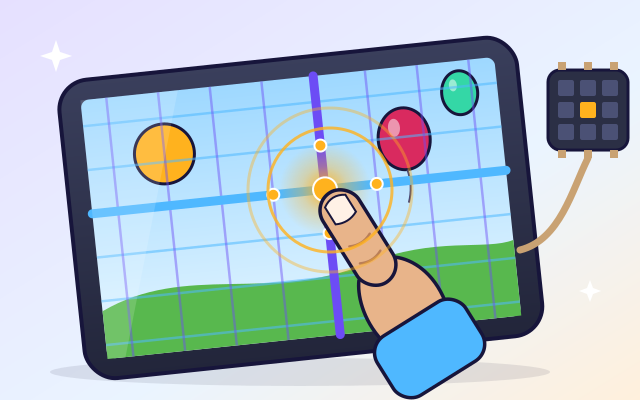
How does a touchscreen know where you touched?
Tap a transparent screen and watch a simplified sensor grid detect the location. Follow that information into a button press, swipe, or drawing.
#50
Computers & communication
How does a touchscreen know where you touched?
Tap a transparent screen and watch a simplified sensor grid detect the location. Follow that information into a button press, swipe, or drawing.
Keep exploring
Games to play next
- Robot RoutesSnap together arrow, repeat and dance blocks to guide Bolt the robot home.
- Bug DetectiveA robot program almost works. Run it, spot the buggy block, and fix it.
- Safe Message DetectiveRead made-up messages, pop-ups and posts, spot the clues, and choose the safe, kind thing to do.
Guide for grown-ups
- How to start homeschooling: a step-by-step guide for familiesA guide for parents · 7 min read
Coding games by grade
Computer skills worksheets by grade
- Preschool Computer Skills Worksheets
- Pre-K Computer Skills Worksheets
- Kindergarten Computer Skills Worksheets
- 1st Grade Computer Skills Worksheets
- 2nd Grade Computer Skills Worksheets
- 3rd Grade Computer Skills Worksheets
- 4th Grade Computer Skills Worksheets
- 5th Grade Computer Skills Worksheets
- 6th Grade Computer Skills Worksheets
- 7th Grade Computer Skills Worksheets
- 8th Grade Computer Skills Worksheets