How does a touchscreen know where you touched?
A grid of invisible wires under the glass notices your finger, works out where it is, and turns your touch into a button press, a swipe or a drawing.
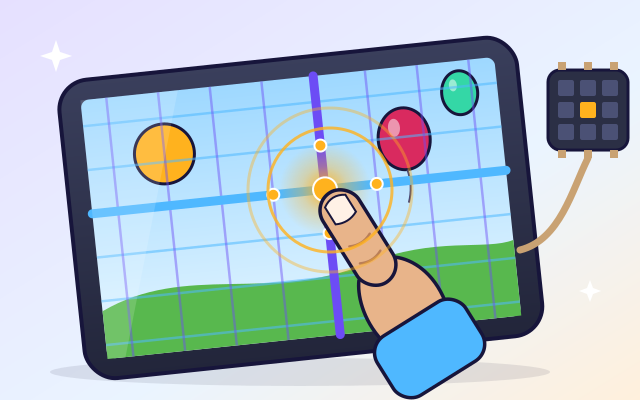
The big idea: A touchscreen has a grid of see-through wires in rows and columns. Your finger changes the electricity where a row and a column cross. A chip checks every crossing many times a second to find the spot, and the tablet decides if you tapped, swiped or drew.
It's like
The interactive parts didn't load. The explanations below still work; try reloading the page.
From fingertip to button press
- You tap a star on a tablet and it pops. The glass doesn't move or click. So how does the tablet know exactly where you touched?
- A touchscreen is a sandwich of layers. On top is strong glass. Under it is a grid of see-through wires in rows and columns. At the bottom is the display that makes the picture.
- Electricity flows into the rows and makes a tiny electric field that reaches the columns. Your finger is a bit like salty water, so it steals some of that field. The column gets less signal.
- A chip checks each row, one after another, and listens on every column. Where the signal drops, it has found your finger: this row, this column!
- The tablet watches how your finger moves. A quick touch in one place is a tap. A fast slide is a swipe. A slow, long path becomes a drawing.
- Because the chip checks every crossing on its own, it can find two or more fingers at the same time. Spread them apart to zoom!
The layers of a touchscreen
The screen has been pulled apart into layers. Tap each part to find out what it does.
- Cover glass. Tough glass protects everything underneath. It's thin enough that the electric field reaches through it to your finger.
- Drive lines (rows). These see-through wires run across the screen in rows. The chip sends a tiny electric signal into one row at a time.
- Sense lines (columns). These wires run up and down in columns. They listen for the signal from the rows. When your finger is near, they hear less.
- Display. Under the touch layers is the display, made of millions of tiny colored lights called pixels. It shows the buttons, games and pictures.
- Flex cable. A thin, bendy cable connects every row and column to the touch chip.
- Touch controller chip. This chip checks every crossing many times a second. It works out where your finger is and sends that spot to the main computer.
- Processor. The main computer gets the touch position and decides what it means: which button you pressed, or whether you swiped or drew.
- Battery. The battery powers everything. Scanning the touch grid uses a little energy every time.
Find the finger
Tap the screen and watch which row and column light up. Then wear the woolly glove and tap again. What happens? Try buttons, swiping and drawing too.
Experiment: Will the screen notice your tap if you wear a woolly glove?
- Tap the screen with your bare finger. Which row and column light up?
- Switch on “Wear a woolly glove” and tap again.
- Look at the controller chip. Did it find anything?
What we found: Your bare finger conducts electricity, so it steals some of the electric field and the chip finds the row and column. Wool doesn't conduct, so the field passes through and nothing changes. Pressing harder doesn't help, because the screen senses electricity, not pushing. That's why special touchscreen gloves have conductive threads in the fingertips.
Turn on JavaScript to try it yourself.
Design a touch grid
Choose how many sensor lines the screen has, then test it. It must find every test tap. Fewer lines cost less and save battery.
Grids, fields and fingers
Most phones and tablets use a capacitive touchscreen. Under the glass is a grid of wires so thin and clear that you can't see them. Some run across in rows and some run up and down in columns.
The touch chip sends a tiny electric signal into one row and listens on the columns. The signal makes an invisible electric field around each place where a row crosses a column. Your body conducts electricity, a bit like salty water, so when your finger comes close it pulls away some of that field. The column hears a weaker signal.
The chip checks every crossing, row by row, many times every second. The crossings with the weakest signal tell it where your finger is. It can even compare neighboring crossings to find spots between the lines.
Then the tablet's main computer decides what you meant. A quick touch is a tap, so it presses the button under your finger. A fast slide is a swipe that turns the page. A long path becomes a drawing. Because every crossing is checked on its own, the screen can feel two fingers at once, which is how pinch-to-zoom works.
Key words
- Capacitive touchscreen
- A screen that senses your finger by the way it changes a tiny electric field.
- Electrode
- A see-through wire in the touch grid.
- Electric field
- The invisible region around electric charges where they can push or pull on other charges.
- Scan
- Checking every crossing of the grid, one row at a time.
- Interpolation
- Working out a spot between the lines by comparing neighbors.
- Gesture
- A pattern of touch movement, such as a tap, a swipe or a pinch.
Check your thinking
-
What does your finger change when it touches a capacitive screen?
Show the answer
The tiny electric field at the crossings. Your finger conducts electricity and steals some of the field, so the chip notices.
-
Why doesn't a wool glove work on a touchscreen?
Show the answer
Wool doesn't conduct electricity, so it doesn't change the field. Touchscreen gloves have conductive threads in the fingertips so they work.
-
Which gesture is a quick touch that stays in one place?
Show the answer
A tap. A tap is short and still. A swipe moves fast, and a pinch uses two fingers.
-
How does the chip find your finger?
Show the answer
It checks every crossing and looks for where the signal drops. The crossings under your finger have a weaker signal, so the chip knows the row and column.
-
How can a screen track two fingers at once?
Show the answer
It measures every crossing separately, so each finger makes its own dip. Mutual-capacitance sensing maps all crossings, so separate touches show up as separate peaks.
You're a Computers & communication expert!
You watched, looked inside, tried it, solved the challenge and went deeper. Pick another question below, or switch the age at the top to see this topic another way.
More about computers & communication
 #51
Computers & communication
How does the internet send a message?
Break a message into packets, route them through a network, and reassemble them. Help packets find another route around a broken connection.
#51
Computers & communication
How does the internet send a message?
Break a message into packets, route them through a network, and reassemble them. Help packets find another route around a broken connection.
 #52
Computers & communication
How do robots work?
Give a robot sensors, motors, and instructions. Help it navigate a maze, avoid obstacles, or sort objects, then improve its behavior.
#52
Computers & communication
How do robots work?
Give a robot sensors, motors, and instructions. Help it navigate a maze, avoid obstacles, or sort objects, then improve its behavior.
 #53
Computers & communication
How do video games work?
Explore input, game rules, animation, collision detection, and scoring. Change gravity or movement speed in a tiny game and play the result.
#53
Computers & communication
How do video games work?
Explore input, game rules, animation, collision detection, and scoring. Change gravity or movement speed in a tiny game and play the result.
 #54
Computers & communication
How does a computer follow instructions?
Explore the processor, memory, storage, and input/output devices. Follow a simple instruction through the system and build a short sequence of commands.
#54
Computers & communication
How does a computer follow instructions?
Explore the processor, memory, storage, and input/output devices. Follow a simple instruction through the system and build a short sequence of commands.
Keep exploring
Games to play next
- Robot RoutesSnap together arrow, repeat and dance blocks to guide Bolt the robot home.
- Bug DetectiveA robot program almost works. Run it, spot the buggy block, and fix it.
- Safe Message DetectiveRead made-up messages, pop-ups and posts, spot the clues, and choose the safe, kind thing to do.
Guide for grown-ups
- How to start homeschooling: a step-by-step guide for familiesA guide for parents · 7 min read
Coding games by grade
Computer skills worksheets by grade
- Preschool Computer Skills Worksheets
- Pre-K Computer Skills Worksheets
- Kindergarten Computer Skills Worksheets
- 1st Grade Computer Skills Worksheets
- 2nd Grade Computer Skills Worksheets
- 3rd Grade Computer Skills Worksheets
- 4th Grade Computer Skills Worksheets
- 5th Grade Computer Skills Worksheets
- 6th Grade Computer Skills Worksheets
- 7th Grade Computer Skills Worksheets
- 8th Grade Computer Skills Worksheets