How does a library track borrowed books?
Every book and every library card has its own number. A computer links them when you borrow, and unlinks them when you return.
The big idea: When you borrow, the computer joins your card number to the book's number and sets a due date. When you return the book, it removes the link and the book is free again.
It's like the sign-out sheet for the class ball: you write your name and the day, and cross it off when the ball comes back.
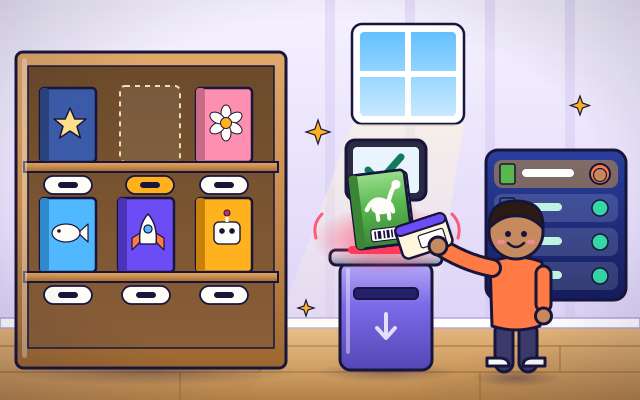
The interactive parts didn't load. The explanations below still work; try reloading the page.
How the library keeps track
- A library lends thousands of books to thousands of people. Mina wants the dinosaur book. How will the library remember that she is the one who has it?
- Inside each book is a label with its own number. No other book has that number. Mina's library card has a number of its own too.
- Mina scans her card, then the book. The computer joins the two numbers. Now the catalog says: dinosaur book, on loan to Mina.
- The computer counts forward from today, here fourteen days, and saves that date with the loan. It is the due date: the day the book should come back.
- When Mina slides the book into the return slot, a scanner reads its label again. The computer removes the link to Mina. The book is marked as back.
- A mark on the book's spine says where it lives on the shelf. Back it goes, so the next reader can find it. Now Theo borrows it, and the record changes again.
The tools that track a book
Tap each thing to see its job in borrowing and returning.
- Library card. Your library card carries your member number. Scanning it tells the computer who is borrowing.
- Book label. A label with the book's own number, as stripes or as a tiny radio tag. No two books in the library share a number.
- Scanner. The scanner reads the card and the book label and sends the two numbers to the computer.
- Catalog. The catalog is the library's list of every book: is it on the shelf or on loan, and when is it due back?
- Due date slip. A slip or a stamp that tells you the due date, so you do not have to remember it.
- Return slot. Books go back through this slot. A scanner inside reads each label and marks the book as returned.
- Shelf mark. A letter or number on the spine that matches a place on the shelves, so every book has a home and can be found again.
Borrow, return and watch the catalog
Tap a child to choose who is borrowing, then tap a book. Tap a borrowed book to return it. Watch the catalog rows change each time.
Experiment: Mina has borrowed a book. Theo asks for the same one. What does the catalog do?
- Tap Mina, then tap a book. Read its catalog row.
- Tap Theo, then tap the empty space where that book was.
- Tap the book in front of Mina to return it, and read the row again.
What we found: One book can only be in one place. The catalog shows it is on loan and gives the due date, so Theo knows when to come back. When the book is returned, the row is cleared and the book is free again.
Turn on JavaScript to try it yourself.
Run the library desk
Lend the right books, put a returned book back in the right place, and use the catalog to answer a question.
How a library tracks its books
A library has a problem that a shop does not have. A shop sells a thing once and it is gone. A library lends the same book again and again, and it needs every book to come home. So it has to remember exactly who has each one.
The trick is numbers. Every single book has a label with its own number, and every member has a card with their own number. When you borrow, a scanner reads both. The library's computer writes a small note: this book is with this member, and it is due back on this date.
The due date is easy for a computer to work out. It takes today's date and counts forward by the loan period, often two or three weeks. Each day it can check all the notes and see which books are due soon or late, and send a friendly reminder.
When you return the book, it is scanned again and the note is removed. The catalog now shows the book as in. If someone else asked for it while it was out, the computer saves it for them. A mark on the spine shows where the book lives, so it goes back to the same spot every time. The sign-out sheet comparison is not perfect: a paper sheet has to be read by a person, but the library's computer can search millions of notes in a moment.
Key words
- Catalog
- The library's searchable list of everything it owns, showing where each item is and whether it is available.
- Loan
- Borrowing: the library's note that a book is with a member until its due date.
- Due date
- The day a borrowed item should be returned: the day it was borrowed plus the loan period.
- Hold
- A request to be next in line for an item that someone else has borrowed.
- Shelf mark
- The letters or numbers on a book's spine that show where it belongs on the shelves.
- Database
- An organized collection of records that a computer can search and update.
Check your thinking
-
What two things does the library scan when you borrow a book?
Show the answer
Your library card and the book's label. The card says who you are and the label says which book it is. The computer joins the two.
-
You return a book. What happens to its row in the catalog?
Show the answer
Your name is removed and the book shows as in. The book stays in the catalog. Only the link to you is removed, so the next reader can borrow it.
-
Today is day 5 and books are lent for 14 days. When is a book borrowed today due back?
Show the answer
Day 19. 5 plus 14 is 19. The computer counts forward from today.
-
Why does every book in a library need a different number, when every carton of the same milk in a shop has the same barcode?
Show the answer
The library must know exactly which book each person has. A shop only needs to know what kind of thing was sold. A library needs each book back, so each one needs its own name.
-
A returned book has a hold on it. What should the system do?
Show the answer
Send it to the hold shelf and tell the waiting member. The hold record means someone is next in line, so the book is saved for them.
You're a Money, shops & services expert!
You watched, looked inside, tried it, solved the challenge and went deeper. Pick another question below, or switch the age at the top to see this topic another way.
More about money, shops & services
 #494
Money, shops & services
How does an emergency call reach the right help?
Follow location details, call assessment, dispatch, and responder updates in a fictional scenario.
#494
Money, shops & services
How does an emergency call reach the right help?
Follow location details, call assessment, dispatch, and responder updates in a fictional scenario.
 #495
Money, shops & services
How do restaurant orders reach the kitchen?
Send an order through preparation stations and coordinate its completion and collection.
#495
Money, shops & services
How do restaurant orders reach the kitchen?
Send an order through preparation stations and coordinate its completion and collection.
 #496
Money, shops & services
How do hotel key cards open the correct door?
Match a card's permission with a model lock and explore how access expires.
#496
Money, shops & services
How do hotel key cards open the correct door?
Match a card's permission with a model lock and explore how access expires.
 #497
Money, shops & services
How do garbage trucks collect and compact waste?
Operate lifting equipment and follow waste through loading and compaction inside a cutaway truck.
#497
Money, shops & services
How do garbage trucks collect and compact waste?
Operate lifting equipment and follow waste through loading and compaction inside a cutaway truck.
Keep exploring
Games to play next
- Coin MarketRun a pretend market stall: pay exactly, use the fewest coins, and give the right change.
- Festival PlannerPlace the stalls, book the acts and keep the budget — make every rule true.
- Supermarket StockerRoll out your cart and make every shelf ready for the day.
Guide for grown-ups
- How to start homeschooling: a step-by-step guide for familiesA guide for parents · 7 min read