How does a 3D printer make an object?
A 3D printer slices a computer design into thin layers, then builds it from melted plastic, layer on layer.
The big idea: A computer cuts the design into thin flat layers. The printer melts plastic and draws each layer on top of the last one. Parts that stick out over thin air need temporary supports underneath.
It's like
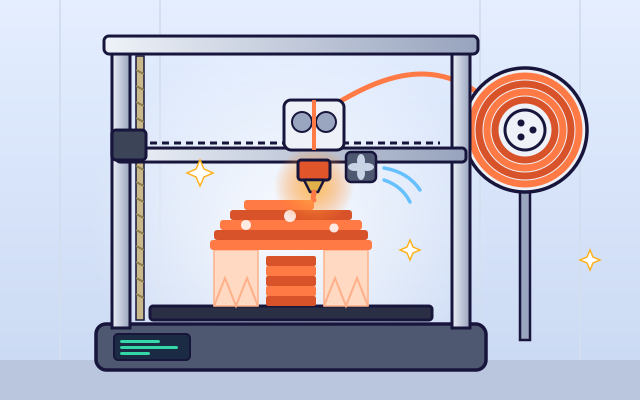
The interactive parts didn't load. The explanations below still work; try reloading the page.
From design to object
- It starts with a design made on a computer. The program stores the shape's whole surface, so you can spin it and see it from every side.
- Next, a program called a slicer cuts the design into hundreds of thin, flat layers. Each one is often thinner than a fingernail.
- For every layer, the slicer plans a path: first the outer walls, then a criss-cross pattern inside called infill. Infill saves plastic but keeps the object strong.
- Plastic string, called filament, is pushed into the hot end. It melts at about 200 degrees Celsius and squeezes out of a tiny nozzle as a thin, soft line.
- The nozzle draws one layer, then the bed moves down a tiny bit, or the nozzle moves up, and it draws the next layer on top. The warm layers stick together.
- The mushroom's cap sticks out over empty air. Without help, the soft plastic droops. So the printer builds thin supports underneath, and you snap them off afterward.
Inside a filament 3D printer
Tap each part of the printer to see what it does. Many of them move!
- Filament spool. The spool holds a long plastic string called filament. It is the printer's material, like ink for a paper printer.
- Extruder. Toothed gears grip the filament and push it into the hot end. Spinning them faster pushes out more plastic.
- Hot end and nozzle. A heater warms a metal block to about 200 degrees Celsius. The filament melts inside, and soft plastic squeezes out of the tiny nozzle.
- Cooling fan. A fan blows on the fresh plastic so it hardens quickly and keeps its shape, especially on small or sticking-out parts.
- Print bed. The object is built on this flat plate. It is often warmed so the first layer sticks well and doesn't curl up.
- Motors and belts. Motors pull rubber belts to slide the nozzle left and right and the bed back and forth, so the nozzle can reach any spot.
- Lead screw (Z axis). When this threaded rod turns, it lifts the nozzle by one thin layer, ready for the next one.
- Controller. The controller reads the instructions from the slicer, line by line, and tells the motors, heater and fan exactly what to do.
Slice and print: layer height
Pick a shape and change the layer height. Look closely at the curved edges and at the print time. Then press Print.
Experiment: What happens when you make the layers thicker?
- Pick the dome. It has a curved side.
- Set the layers to Tiny, then to Chunky.
- Compare the zoomed edge and the print time each time.
What we found: Thicker layers mean fewer layers, so the print finishes sooner. But each layer is a flat step, so curved parts look like stairs. Thin layers look smooth but take much longer.
Turn on JavaScript to try it yourself.
Support the overhangs
Add supports only where the plastic would droop, then print. Remember: gentle slopes can print on their own.
Building in layers
Most things are made by cutting material away or by pouring it into a mold. A 3D printer adds material instead, one thin layer at a time. That's why it's called additive manufacturing. It can make shapes that would be hard to carve or mold.
First the design is sliced into flat layers by a computer program. For each layer, it plans a path: around the outside first, then a pattern inside called infill. The printer follows the path while it squeezes out melted plastic, then moves up and does the next layer.
Thin layers make a smooth object but take a long time, because there are so many of them. Thick layers are quicker, but curved parts look like little stairs. People choose the layer height that suits the job.
Each new layer needs something underneath it. A layer can stick out a little past the one below, so gentle slopes are fine. But a flat part sticking straight out over air would droop, so the printer builds thin, breakable supports and you remove them afterward.
Key words
- Filament
- The long plastic string that a 3D printer melts to build objects.
- Slicer
- A computer program that cuts a design into flat layers and plans the printer's path.
- Layer height
- How thick each printed layer is, often about 0.2 millimeters.
- Infill
- The pattern that fills the inside of a print. It saves plastic but adds strength.
- Overhang
- A part of an object that sticks out past the layer below it.
- Supports
- Temporary structures that hold up overhangs while printing and are removed afterward.
- Additive manufacturing
- Making objects by adding material layer by layer, rather than cutting it away.
Check your thinking
-
How does a filament 3D printer build an object?
Show the answer
By squeezing melted plastic into thin layers, one on top of another. The printer adds plastic one layer at a time, following the slicer's plan.
-
What happens to the filament in the hot end?
Show the answer
It melts and squeezes out of the nozzle. The hot end heats it to about 200 degrees Celsius, so it melts and flows out as a thin line.
-
Why do some prints need supports?
Show the answer
Soft plastic can't be printed on empty air, so it would droop. Each layer needs something underneath it. Supports hold up the parts that stick out over air.
-
You switch from thin layers to thick layers. What happens?
Show the answer
It prints faster, but curves look more like stairs. Thicker layers mean fewer layers to print, but each one is a bigger flat step.
-
Why don't most prints have solid insides?
Show the answer
Infill patterns save plastic and time but still give strength. Walls carry most of the load. A partial infill pattern supports the top layers and adds strength with much less material.
-
While printing, what holds up a flat part that sticks out over thin air?
Show the answer
Supports underneath. Supports are thin, breakable structures printed underneath. You snap them off when the print is done.
You're a Making everyday things expert!
You watched, looked inside, tried it, solved the challenge and went deeper. Pick another question below, or switch the age at the top to see this topic another way.
More about making everyday things
 #301
Making everyday things
How is steel made?
Follow iron through a simplified steelworks and shape finished steel into useful products.
#301
Making everyday things
How is steel made?
Follow iron through a simplified steelworks and shape finished steel into useful products.
 #302
Making everyday things
How are aluminum drink cans made?
Form a metal disc into a can, then trim, coat, decorate, and attach a lid.
#302
Making everyday things
How are aluminum drink cans made?
Form a metal disc into a can, then trim, coat, decorate, and attach a lid.
 #303
Making everyday things
How are rubber tires made?
Assemble rubber layers, reinforcement, and tread before shaping and curing in a mold.
#303
Making everyday things
How are rubber tires made?
Assemble rubber layers, reinforcement, and tread before shaping and curing in a mold.
 #304
Making everyday things
How are shoes made?
Assemble upper pieces around a foot-shaped form and attach the sole.
#304
Making everyday things
How are shoes made?
Assemble upper pieces around a foot-shaped form and attach the sole.
Keep exploring
Games to play next
- Geometry Architect 3DCount, build and fold solids like a real architect.
- Machine RepairFix levers, pulleys, gears and ramps so every contraption works.
- Sorting FactoryTurn a work order into if/else rules and watch the conveyor sort every item.
Guide for grown-ups
- How to start homeschooling: a step-by-step guide for familiesA guide for parents · 7 min read
Science games by grade
Science worksheets by grade
- Preschool Science Worksheets
- Pre-K Science Worksheets
- Kindergarten Science Worksheets
- 1st Grade Science Worksheets
- 2nd Grade Science Worksheets
- 3rd Grade Science Worksheets
- 4th Grade Science Worksheets
- 5th Grade Science Worksheets
- 6th Grade Science Worksheets
- 7th Grade Science Worksheets
- 8th Grade Science Worksheets