How do digital tickets open entry gates?
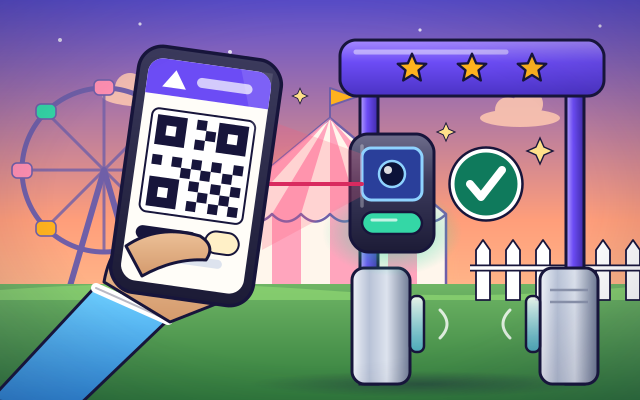
A ticket on a phone is a number hidden in a square code. The gate scans it, looks it up on a list and marks it as used.
The big idea: Your ticket carries a number that is yours alone. The gate asks a list three things: is it on the list, is it for today, and is it still unused? Then it marks the ticket as in.
It's like a guest list at a party: the helper finds your name, lets you in and crosses it off, so nobody else can use your name.
The interactive parts didn't load. The explanations below still work; try reloading the page.
From your phone to an open gate
- You are off to the Star Fair, and your ticket is on a phone. There is no paper and nobody tears a corner off. So how does the gate know your ticket is real?
- The square pattern is a code. The black and white squares spell out your ticket's own number. No other ticket in the world has the same one.
- Hold the phone up to the scanner. A camera takes a picture of the squares, and a small computer turns the pattern back into your ticket number.
- The gate sends the number to a list of every ticket that was sold. It asks three questions. Is this number on the list? Is it for today? Has it been used yet?
- All three answers are good, so the list says yes. The light turns green and the gate opens. At the same moment, the list marks your ticket as in.
- What if someone copied your ticket? The copy has the very same number. But the list says that number is already in, so the gate stays shut. Keep your ticket to yourself!
The parts of a ticket gate
Tap each part. Watch what it does when a ticket is scanned.
- Ticket code. The square code on the phone holds your ticket's number. The three big squares in the corners help the camera find the code and turn it the right way up.
- Scanner. Behind the small window is a camera with its own light. It takes a picture of the code many times a second until it can read it.
- Gate computer. A small computer inside the gate takes the ticket number from the scanner, sends it to the list and waits for the answer: yes or no.
- The ticket list. The list is kept on a computer that every gate can reach. It has one line for every ticket sold, with the ticket's number and the day it is for.
- Entry status. Next to each ticket is its status. It starts as new. When the ticket is used, the status changes to in. That change is what stops a copy.
- Barrier. Two flaps block the way. When the list says yes, a motor swings them open for one person, then closes them again.
- Light and beep. A light and a beep tell you the answer straight away. Green and a happy beep mean come in. Red means a helper needs to look at your ticket.
Scan tickets and watch the list
Choose a ticket and scan it: drag the phone to the scanner, or tap the scanner. Watch the list. Then try the copy.
Experiment: Ticket K7 has just been used. Someone holds up a perfect copy of it. What will the gate do?
- Scan ticket K7 and watch its line on the list.
- Now choose the copy of K7 and scan it.
- Try the ticket for Sunday and the made-up ticket too.
What we found: The copy carries the same number, so the gate finds the same line on the list. That line already says in, so the gate stays shut. The list, not the picture, decides.
Turn on JavaScript to try it yourself.
You are the ticket list
Check each visitor's ticket against the list and today's day. Open the gate only if the ticket is on the list, for today and not used yet.
Why a copy does not get in
A ticket on a phone is really just a number. The number is hidden in a pattern of black and white squares, because a camera can read squares very quickly and very reliably. Every ticket that is sold gets its own number, and no two are the same.
The seller keeps a list of all those numbers on a computer that the gates can talk to. When you hold up your phone, the gate's camera reads the squares and the gate asks the list: is this number here, is it for today, and is it still unused? If every answer is good, the gate opens.
Here is the clever part. At the moment the gate opens, the list changes your ticket's status from new to in. A copy of your ticket has the same number. So when someone tries the copy, the gate finds the same line on the list, sees that it already says in, and stays shut.
This means a ticket is only safe while nobody else has its number. If you share a photo of your ticket and someone gets to the gate before you, they get in and you do not. Keep your ticket private, and ask a grown-up before buying tickets from strangers, because you cannot tell by looking whether a code has already been used.
Key words
- Identifier
- A number or name that belongs to exactly one thing, like your ticket.
- Scanner
- A camera and a small computer that read a code and turn it back into a number.
- Database
- A list kept on a computer, with one line for every ticket.
- Status
- What the list says about a ticket right now: new, in or out.
- Verify
- To check that something is real and allowed before trusting it.
Check your thinking
-
What does the gate do after it reads the squares on your ticket?
Show the answer
It asks a list whether that ticket number is good. The squares are a number. The gate sends that number to the list and waits for yes or no.
-
Why does a perfect copy of a used ticket not open the gate?
Show the answer
The list already marked that number as in. The copy has the same number, so it finds the same line on the list, and that line now says in.
-
Your ticket is for Sunday. You try it at the gate on Saturday. What happens?
Show the answer
The gate stays shut: the ticket is on the list, but for the wrong day. Being on the list is not enough. The day has to match too.
-
Why should you not post a photo of your ticket for everyone to see?
Show the answer
Someone could scan it first, and then your ticket would say already in. The gate cannot tell who the real owner is. Whoever scans the number first gets in.
-
A ticket's code changes every 30 seconds. Why does that defeat screenshots?
Show the answer
A screenshot shows an old code, which the server no longer accepts. The server and the app both compute the current code from a shared secret and the time. An old image no longer matches.
You're a Money, shops & services expert!
You watched, looked inside, tried it, solved the challenge and went deeper. Pick another question below, or switch the age at the top to see this topic another way.
More about money, shops & services
 #500
Money, shops & services
How does the cold chain keep food chilled during delivery?
Follow food through storage, refrigerated transport, shops, and temperature checks along its journey.
#500
Money, shops & services
How does the cold chain keep food chilled during delivery?
Follow food through storage, refrigerated transport, shops, and temperature checks along its journey.
 #481
Money, shops & services
How does an ATM dispense money?
Follow card verification, account checks, note counting, and dispensing inside a transparent machine.
#481
Money, shops & services
How does an ATM dispense money?
Follow card verification, account checks, note counting, and dispensing inside a transparent machine.
 #482
Money, shops & services
How does a debit-card payment work?
Trace a purchase through merchant, payment network, and bank using pretend account balances.
#482
Money, shops & services
How does a debit-card payment work?
Trace a purchase through merchant, payment network, and bank using pretend account balances.
 #483
Money, shops & services
How does a credit-card payment work?
Follow a purchase, statement, and repayment using a fictional account and simple balances.
#483
Money, shops & services
How does a credit-card payment work?
Follow a purchase, statement, and repayment using a fictional account and simple balances.
Keep exploring
Games to play next
- Festival PlannerPlace the stalls, book the acts and keep the budget — make every rule true.
- Timetable TerminalRead the departure board, count the minutes and catch your connection on time.
- Coin MarketRun a pretend market stall: pay exactly, use the fewest coins, and give the right change.
Guide for grown-ups
- How to start homeschooling: a step-by-step guide for familiesA guide for parents · 7 min read